
OpenCode vs Claude Code comes down to one difference: OpenCode is open-source (MIT) and model-agnostic, running 75+ providers plus local models, while Claude Code is Anthropic's official, Claude-only harness. Pick OpenCode for provider freedom, cheaper access (Go at $10/mo or BYOK), local models, and a desktop app. Pick Claude Code for autonomous /goal workflows, Agent View fleet management, instant checkpoint undo, and the tightest Anthropic model integration.
TL;DR: The Quick Answer
OpenCode = Open source + 75 providers + desktop app + 16M monthly devs + Scout subagent + background agents.
Claude Code = Proprietary + Anthropic-only + Agent View fleet management + /goal autonomy + 10%+ of all GitHub commits.
OpenCode still leads on GitHub stars (210K vs 148K as of September 2026), but Claude Code has closed the gap from 112K vs 71K in February. More importantly, Claude Code dominates actual usage: 10%+ of all public GitHub commits (peaking at 326K/day in March), projected to hit 20%+ by end of year. Both tools shipped major updates since our last comparison. Claude Code added Agent View (a fleet dashboard for all running sessions), the /goal command for autonomous task completion, Opus 4.8 as the default model, and a full plugin ecosystem. OpenCode added a Scout subagent for external docs research, background subagents, auto-compact for context management, and Go ($10/mo for open-weight models).
GitHub Stars: The 210K vs 148K Battle
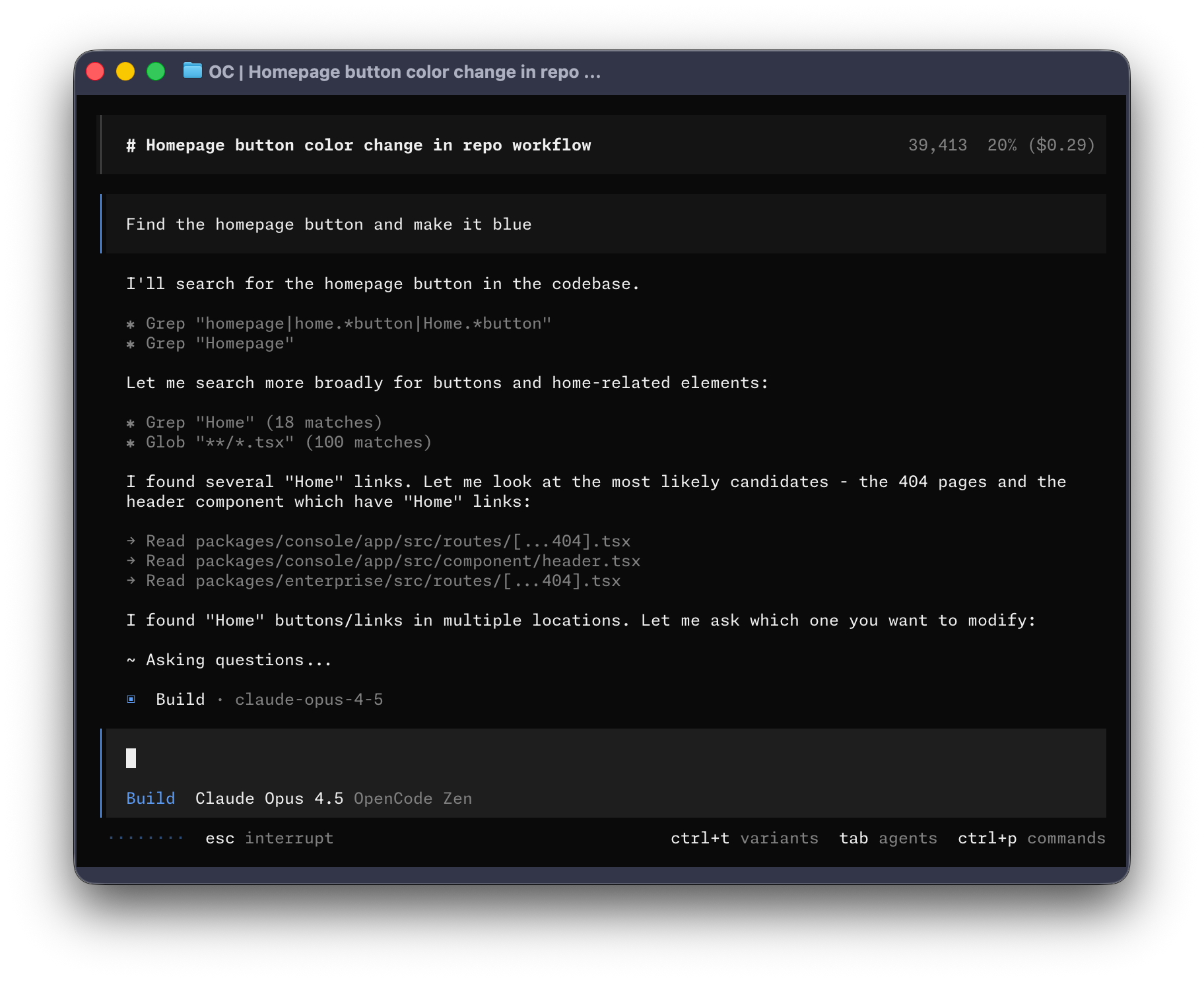
OpenCode's terminal UI. Source: github.com/anomalyco/opencode
OpenCode (under anomalyco/opencode after SST rebranded to Anomaly) has grown from 112K stars in February to 210K in September 2026. 950+ contributors, 802 releases total, 13K+ commits. Claude Code grew even faster in percentage terms, from 71K to 148K stars as of September 2026. But the more telling metric is commit share: Claude Code hit 326K public GitHub commits in a single day on March 15, 2026, up from 135K/day in February. SemiAnalysis estimates Claude Code crossed 10% of all public commits by late Q1, tracking toward 20%+ by year-end.
| Metric | OpenCode | Claude Code |
|---|---|---|
| GitHub Stars | 210,000 | 148,000 |
| Forks | 18,900 | 20,400 |
| Contributors | 950+ | Anthropic team |
| Latest Version | v1.18.32 (September 21, 2026) | v2.1.289 (October 3, 2026) |
| License | MIT (open source) | Proprietary |
| Primary Language | TypeScript (57.6%) | TypeScript/Node.js |
| Monthly Active Devs | 16M | Not disclosed (10%+ of GH commits) |
| Total Releases | 802 | 143+ (2.1.x series) |
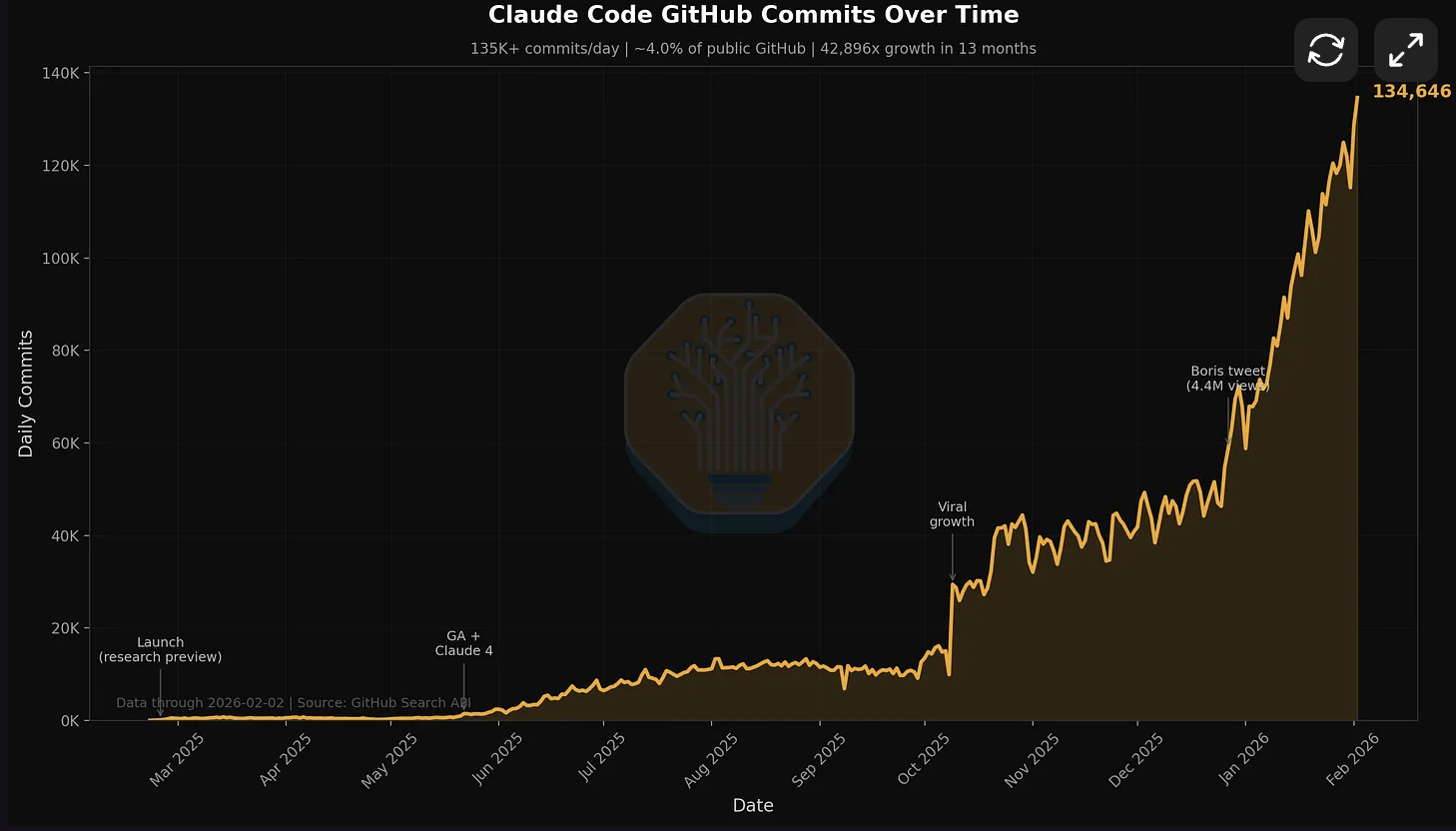
Source: SemiAnalysis / GitHub Search API. Claude Code peaked at 326K daily commits in March 2026, crossing 10% of all public GitHub commits by late Q1.
The Anthropic OAuth Block: The Watershed Moment
On January 9, 2026, Anthropic silently blocked OpenCode from using Claude via consumer OAuth tokens. OpenCode removed Claude Pro/Max support from the codebase, citing "anthropic legal requests." The developer backlash on Hacker News was immediate and fierce.
OpenCode responded by launching Black ($200/mo, sold out), Zen (pay-as-you-go curated gateway), and most recently Go ($10/mo for open-weight models like GLM-5.1, Kimi K2.5, DeepSeek V4). OpenAI publicly welcomed third-party tools as counter-positioning.
This event split the community. Developers who valued provider freedom rallied around OpenCode. Developers who wanted the tightest possible model integration stayed with Claude Code. Five months later, both sides doubled down: OpenCode shipped background subagents and a Scout agent for external research, while Claude Code shipped Agent View, /goal autonomy, and Opus 4.8.
System Prompt Deep Dive
We extracted Claude Code's system prompts from the compiled source code. Here's what powers each tool's "brain."
Claude Code System Prompt Architecture
Claude Code v2.1.176 uses a modular prompt system with 40+ components totaling thousands of tokens. Since February, Anthropic added plugin-injected skills, agent-type hook messages, and effort-level awareness to the prompt pipeline:
Claude Code Prompt Structure (Extracted, v2.1.176)
// Claude Code System Prompt Components
├── Core System Prompt (2,896 tokens)
│   ├── Identity & capabilities
│   ├── Tool usage instructions
│   └── Response formatting rules
│
├── Subagent Prompts
│   ├── Plan Mode Enhanced (633 tokens)
│   ├── Explore Agent (516 tokens)
│   ├── Task Tool (294 tokens)
│   └── Agent View orchestration (new)
│
├── Tool Descriptions (20+ built-in tools)
│   ├── Write, Read, Edit, Bash
│   ├── Task, TodoWrite, Glob, Grep
│   ├── WebFetch, WebSearch
│   ├── NotebookEdit, KillShell
│   ├── EnterWorktree, ExitWorktree
│   └── Plugin-provided tools (dynamic)
│
├── Autonomy Prompts (new in v2.1.139+)
│   ├── /goal evaluator (validator model)
│   ├── Agent View session management
│   ├── /ultrareview code review skill
│   └── /ultraplan cloud environment planner
│
├── Utility Prompts
│   ├── Conversation summarization + recap
│   ├── Session management + persistence
│   ├── CLAUDE.md creation (384 tokens)
│   ├── Security review (2,610 tokens)
│   └── Agent creation architect (1,110 tokens)
│
└── Slash Command Prompts (expanded)
    ├── /goal, /loop, /focus, /effort
    ├── /ultrareview, /ultraplan
    ├── /pr-comments, /review-pr
    ├── /team-onboarding
    └── /security-review (2,610 tokens)
OpenCode System Prompt Architecture
OpenCode uses a file-based prompt system with YAML frontmatter:
OpenCode Agent Configuration
# .opencode/agents/build.md (Primary Agent)
---
name: build
description: Default agent for development work
mode: primary
model: anthropic/claude-sonnet-4  # Or any provider
temperature: 0.7
tools:
  write: true
  edit: true
  bash: true
  webfetch: true
  task: true
  todo: true
permission:
  edit: allow
  bash: ask
  webfetch: allow
maxSteps: 50
---

You are a coding assistant focused on software development.
[Custom instructions follow...]

# .opencode/agents/plan.md (Read-only Agent)
---
name: plan
description: Analysis and exploration agent
mode: primary
permission:
  edit: deny
  bash: ask
---

You are an analyst. Read code, explain patterns,
but do not modify files unless explicitly asked.Claude Code: Core prompts are still baked in, but the plugin ecosystem (v2.1.117+) now allows third-party skills, hooks, and MCP servers to inject behavior. Custom themes via /theme, vim visual mode, and /effort sliders give more control. The gateway /v1/models endpoint lets you point at compatible proxies.
OpenCode: Everything is a markdown file. Drop new agents in .opencode/agents/ and they're instantly available. v1.15.0 added effect-based event systems and background subagents. The Tauri desktop app ships on macOS/Windows/Linux with MCP connection status UI. Remote config via .well-known/opencode enables enterprise fleet management.
Tool Definitions: 20+ Tools Compared
Claude Code ships with 20 built-in tools. OpenCode has a similar core set but approaches extensibility differently.
Claude Code Built-in Tools (Extracted)
Claude Code Tool Inventory
// Claude Code v2.1.176 Built-in Tools
const CLAUDE_CODE_TOOLS = [
  // File Operations
  "Read",           // Read files with line ranges
  "Write",          // Create/overwrite files
  "Edit",           // Search-replace edits
  "Glob",           // Find files by pattern (native binary)
  "Grep",           // Search file contents (native binary)

  // Execution
  "Bash",           // Execute shell commands
  "KillShell",      // Terminate running shells
  "NotebookEdit",   // Edit Jupyter notebooks

  // Agent System
  "Task",           // Spawn subagents
  "TodoWrite",      // Track task progress

  // Worktree Management (new)
  "EnterWorktree",  // Isolate background work
  "ExitWorktree",   // Return to main working copy

  // Web & External
  "WebFetch",       // Fetch web content
  "WebSearch",      // Search the web

  // IDE Integration
  "AskUserQuestion", // Request user input
  "EnterPlanMode",   // Switch to planning
  "ExitPlanMode",    // Exit planning

  // Plugin Tools (new in 2.1.117+)
  "plugin__*",      // Plugin-provided tools/skills

  // MCP Tools
  "mcp__*",         // Dynamically loaded MCP tools
];
OpenCode Built-in Tools
OpenCode Tool Inventory
// OpenCode v1.18.18 Built-in Tools
const OPENCODE_TOOLS = [
  // File Operations
  "read",           // Read files with line ranges
  "write",          // Create/overwrite files
  "edit",           // Search-replace edits
  "glob",           // Find files by pattern
  "grep",           // Search with ripgrep

  // Execution
  "bash",           // Execute shell commands

  // Agent System
  "task",           // Spawn subagents (General, Explore, Scout)
  "todo",           // Track task progress
  "skill",          // Load reusable instruction sets

  // Web
  "webfetch",       // Fetch and process web content

  // MCP Tools
  "mcp_*",          // Declaratively configured MCP tools
];

// Built-in Subagents (v1.14.42+):
// General  - full tool access, multi-step tasks
// Explore  - read-only codebase navigation
// Scout - read-only external docs & dependency research| Tool Category | Claude Code | OpenCode |
|---|---|---|
| File editing | Edit (search-replace) | edit (search-replace) |
| Web search | WebSearch (built-in) | Via MCP |
| Notebook support | NotebookEdit (native) | Via MCP |
| Skill system | Skills + plugins (marketplace) | skill tool (native) |
| LSP integration | LSP diagnostics (v2.1.121+) | Out-of-the-box |
| MCP loading | Tool Search (lazy) + alwaysLoad | Declarative (per-agent) |
| Worktree isolation | EnterWorktree/ExitWorktree | Not available |
| External docs research | Via WebFetch | Scout subagent (native) |
The MCP Tool Search Revolution
Anthropic recently released MCP Tool Search for Claude Code, introducing "lazy loading" for tools. This reduced token usage from ~134K to ~5K in their testing. OpenCode has always used declarative tool loading:
MCP Tool Configuration Comparison
// Claude Code: MCP tools via mcp.json
{
  "mcpServers": {
    "filesystem": {
      "command": "npx",
      "args": ["-y", "@modelcontextprotocol/server-filesystem", "/path"]
    }
  }
}
// All tools loaded into context at startup
// New: Tool Search enables lazy loading

// OpenCode: Declarative per-agent control
// opencode.json
{
  "tools": {
    "mymcp_*": true,          // Enable for all agents
    "dangerous_tool": false   // Disable globally
  },
  "agent": {
    "build": {
      "tools": {
        "mymcp_write": true,
        "mymcp_delete": false  // Disable for this agent
      }
    }
  }
}
Subagent Architecture Analysis
Both tools shipped major subagent upgrades since February. Claude Code added Agent View (a fleet dashboard for all running sessions) and /goal (autonomous completion with a validator model). OpenCode added Scout (external docs/dependency research), background subagents, and session pinning.
Claude Code: Agent View gives you a single dashboard for every session (running, blocked, done). The /goal command makes Claude autonomous: a validator model checks completion after every step. Native worktree isolation keeps parallel sessions from stepping on each other.
OpenCode: Tab to switch agents, @mention to invoke subagents, HTTP API for remote control. Scout subagent researches external docs without leaving your session. Background subagents run tasks while you keep working.
Claude Code Subagent System (Native)
Claude Code Agent Hierarchy (v2.1.176)
// Claude Code Subagent Architecture (May 2026)
Agent View Dashboard (new: v2.1.139)
│   ├── Shows all sessions: Running / Blocked / Done
│   ├── Navigate between sessions
│   └── Peek at results without switching
│
├── /goal Command (new: v2.1.139)
│   ├── Set completion condition
│   ├── Validator model checks after every step
│   ├── Claude works autonomously until goal met
│   └── Enables true fire-and-forget workflows
│
├── Plan Mode (633 tokens prompt)
│   ├── Triggered via /plan or EnterPlanMode
│   ├── Read-only by default
│   ├── /ultraplan for cloud environment planning
│   └── Exits with ExitPlanMode tool
│
├── Explore Agent (516 tokens prompt)
│   ├── Fast codebase navigation
│   ├── Read-only access
│   └── Returns findings to parent
│
├── Task Agent (294 tokens prompt)
│   ├── Complex multi-step workflows
│   ├── Own context window + worktree isolation
│   ├── Background sessions with --bg flag
│   └── Results summarized to parent
│
├── Custom Agents (user-defined)
│   ├── Defined in .claude/agents/
│   ├── Inherit tool access from config
│   └── Agent-specific hooks and MCP servers
│
└── Plugin Agents (new: v2.1.117+)
    ├── Installed from plugin marketplace
    ├── Provide skills, hooks, and MCP servers
    └── Dependency enforcement between plugins

// Key Features:
// Esc twice = instant rewind to last checkpoint
// /loop = proactive monitoring mode
// /focus = distraction-free fullscreen
// Worktree isolation for parallel sessions
OpenCode Subagent System (User-Configurable)
OpenCode Agent Hierarchy + Interactivity (v1.18.18)
// OpenCode Agent Architecture (May 2026)
// KEY ADVANTAGE: Superior interactivity + Scout

Primary Agents (Tab to switch instantly)
├── Build Agent (default)
│   ├── All tools enabled
│   ├── Full filesystem access
│   └── For development work
│
└── Plan Agent
    ├── Read-only by default
    ├── Asks permission for bash
    └── For analysis/exploration

Subagents (via Task tool or @mention)
├── @general - Complex multi-step tasks (parallel)
├── @explore - Read-only codebase navigation
├── @scout  - External docs & dependency research (new)
│   ├── Clones dependency repos into cache
│   ├── Inspects library source code
│   └── Read-only, never modifies workspace
└── @custom - Your own agents from .opencode/agents/

// Background Subagents (new: v1.14.51)
// Tasks keep running while you continue working
// Session pinning with quick slots (v1.14.49)

// INTERACTIVITY FEATURES:
// 1. Tab - instant agent switching
// 2. @agent_name - invoke any subagent inline
// 3. HTTP API - control from mobile/remote
// 4. Persistent sessions - survives terminal close
// 5. Session pinning - quick slots for fast access
// 6. Auto-compact - intelligent context summarizationAgent View: A single dashboard showing every session (running, blocked, done). Navigate between sessions, peek at results. Shipped as a research preview in v2.1.139.
/goal command: Set a completion condition. A small, fast validator model runs after every step and answers one question: "Has the goal been met?" If no, the main model keeps going. Enables true fire-and-forget autonomous workflows.
Instant rewind: Esc twice to restore to the last checkpoint. "Summarize up to here" option added in v2.1.141.
Worktree isolation: Background sessions run in separate git worktrees, so parallel agents never step on each other's changes.
Scout subagent: Dedicated read-only agent for external docs and dependency research. Clones library repos into cache, inspects source without modifying your workspace.
Background subagents: Tasks keep running while you continue working (v1.14.51). Combined with session pinning and quick slots for fast access.
Tab switching + @mentions: Instantly swap between Build and Plan agents. Invoke @explore, @scout, @general, or custom agents inline.
HTTP API: Control sessions from mobile, tablets, or remote machines. Start a task at your desk, review on your phone.
Context Management & Compaction
Long coding sessions require sophisticated context management. Without it, context rot degrades agent performance as earlier instructions get pushed out. Both tools handle this differently, and tools like FlashCompact can accelerate context compression regardless of which agent you use.
Claude Code Context Strategy
Claude Code Context Management
// Claude Code uses automatic compaction
// Triggered near context limit

// Compaction process:
1. Detect approaching context limit
2. Summarize previous messages (utility prompt)
3. Preserve critical context (file contents, etc.)
4. Continue with reduced token count

// Manual compaction:
$ /compact     # Slash command to force compaction

// Context advice from Anthropic:
// "If using Claude in an agent harness that compacts context,
// add this to your prompt so Claude can behave accordingly.
// Otherwise Claude may try to wrap up work as it
// approaches the context limit."
OpenCode Context Strategy
OpenCode Context Management
// OpenCode now has auto-compact (v1.14+)
// Plus provider-dependent Vercel AI SDK handling

// Auto-compact:
// - Intelligently summarizes conversation history
// - Manages token usage across long sessions
// - System agent handles compaction automatically

// Session persistence:
// - Server-side state via Hono HTTP API
// - Sessions survive terminal closure
// - Session pinning + quick slots (v1.14.49)
// - Can reconnect from mobile app

// LSP Integration:
// - Automatic symbol awareness
// - Language-specific context enrichment
// - Better code navigation than text-based approaches| Feature | Claude Code | OpenCode |
|---|---|---|
| Auto-compaction | Yes (built-in + reactive) | Yes (auto-compact, v1.14+) |
| Manual compaction | /compact command | Auto-compact system agent |
| Session persistence | Background sessions + --bg | Server-side (survives close) |
| Session recap | Yes (v2.1.108+, returning users) | Session pinning + quick slots |
| LSP awareness | LSP diagnostics (v2.1.121+) | Native integration |
| Context window | 1M (Opus 4.8 autocompact) | Provider-dependent |
Permission & Security Models
How each tool handles dangerous operations reveals their security philosophies.
Claude Code Permission System
Claude Code Permission Configuration
// claude.permissions in settings.json
{
  "claude.permissions": {
    "edit": "ask",           // ask | allow | deny
    "bash": "ask",
    "bash.rm": "deny",       // Specific command patterns
    "bash.git": "allow",
    "webfetch": "allow"
  }
}

// Permission flow:
1. Tool call requested
2. Check permission config
3. If "ask": Show confirmation dialog
4. If "allow": Execute immediately
5. If "deny": Block with error

// Dangerous operation detection:
// Built-in heuristics for destructive commands
// Even with "allow", warns on rm -rf /, etc.
OpenCode Permission System
OpenCode Permission Configuration
// opencode.json permission configuration
{
  "permission": {
    "edit": "allow",
    "bash": {
      "*": "ask",              // Default: ask for all
      "git *": "allow",        // Allow git commands
      "npm test": "allow",
      "npm install": "ask",
      "rm -rf *": "deny",      // Block dangerous patterns
      "sudo *": "deny"
    },
    "webfetch": "allow",
    "task": {
      "general": "allow",
      "explore": "allow",
      "custom-*": "ask"
    },
    "skill": {
      "pr-review": "allow",
      "dangerous-*": "deny"
    }
  }
}

// Permission inheritance:
// Agent-specific overrides in frontmatter
// Last matching glob pattern winsClaude Code assumes you want protection by default, with explicit allows. Better for teams with mixed trust levels.
OpenCode assumes power users who want granular control via glob patterns. More flexible but requires careful configuration.
MCP Integration Patterns
Both tools support the Model Context Protocol, but with different loading strategies.
Claude Code MCP Approach
- Eager loading: All MCP tools loaded at startup (changing with Tool Search)
- Token cost: ~134K tokens with many MCPs (reduced to ~5K with Tool Search)
- Configuration:
mcp.jsonin project root - Server types: Supports stdio and HTTP MCP servers
OpenCode MCP Approach
- Declarative loading: Tools loaded per-agent based on config
- Glob patterns:
mymcp_*: trueenables all tools from an MCP - Configuration:
opencode.jsonoropencode.jsonc - Context efficiency: Only configured tools enter context
MCP Configuration Comparison
// Claude Code: mcp.json
{
  "mcpServers": {
    "postgres": {
      "command": "npx",
      "args": ["-y", "@modelcontextprotocol/server-postgres"],
      "env": { "DATABASE_URL": "..." }
    },
    "github": {
      "command": "npx",
      "args": ["-y", "@modelcontextprotocol/server-github"]
    }
  }
}

// OpenCode: opencode.json
{
  "mcp": {
    "postgres": {
      "command": "npx",
      "args": ["-y", "@modelcontextprotocol/server-postgres"],
      "env": { "DATABASE_URL": "..." }
    }
  },
  "agent": {
    "build": {
      "tools": {
        "postgres_query": true,
        "postgres_execute": false  // Read-only for this agent
      }
    }
  }
}
Performance Benchmarks
Real-world task benchmarks reveal practical differences.
| Task | OpenCode | Claude Code |
|---|---|---|
| Cross-file refactor | ✓ Correct, 4m 20s | ✓ Correct, 2m 15s |
| Bug fix from error | ✓ Correct, 3m 10s | ✓ Correct, 1m 45s |
| Test generation | 94 tests, 8m 50s | 73 tests, 5m 9s |
| Total time | 16m 20s | 9m 9s |
| Code reformatting bugs | Yes (all 3 models) | No |
Claude Code completes tasks ~45% faster, but OpenCode generates ~29% more tests. The reformatting bug ("All three models tested with OpenCode tried to reformat existing code") suggests a harness-level issue, not model quality.
Formal Benchmarks (October 2026)
Claude Mythos Preview (currently suspended, see note) now leads SWE-bench Pro at 77.8%, up from 57.5% in February. Claude Opus 4.8 (Adaptive) scores 69.2% on SWE-bench Pro and 88.6% on SWE-bench Verified. The gap between Verified (easier, potentially contaminated) and Pro (harder, private test cases) remains significant: top models score ~77% on Pro vs 87%+ on Verified. OpenCode's benchmark performance depends entirely on the model behind it. With Claude Opus 4.8 via API key, it matches Claude Code on raw model capability. The harness overhead (reformatting bugs, prompt engineering differences) accounts for the remaining gap.
Token Efficiency
Claude Code's model-specific optimization shows in token usage. The 1M-context autocompact window (v2.1.128) and 1-hour prompt cache TTL (v2.1.108) reduce costs on long sessions:
The Pricing Reality
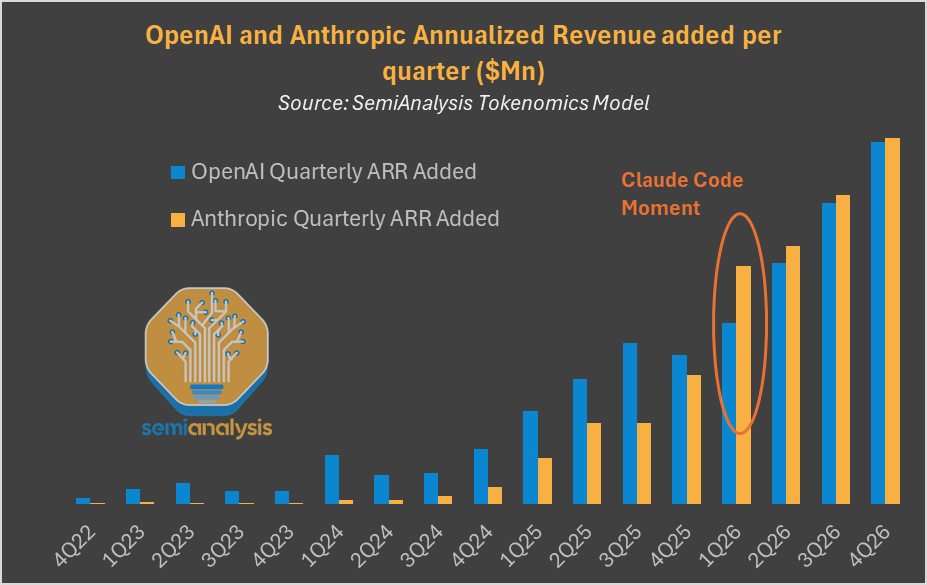
Source: SemiAnalysis. Anthropic's ARR growth accelerated sharply at the "Claude Code Moment." This revenue trajectory shapes the pricing dynamics between OpenCode (free/BYOK) and Claude Code (subscription).
This is where OpenCode has an unassailable advantage.
| Aspect | OpenCode | Claude Code |
|---|---|---|
| Tool cost | Free (MIT license) | Free |
| Cheapest model access | Go ($10/mo open-weight models) | $20/mo Claude Pro |
| Mid-tier access | Zen (pay-as-you-go) or BYOK | $100/mo Max 5x |
| Premium access | Black ($200/mo, sold out) | $200/mo Max 20x |
| Total minimum cost | $0 (local models via Ollama) | $20/month |
| Enterprise option | Self-hosted or remote config | Anthropic Enterprise + Teams |
| Local model support | Yes (Ollama, streaming v2) | No |
| Desktop/IDE | Tauri app (macOS/Win/Linux) | VS Code ext + Homebrew + curl |
OpenCode now has three gateway tiers: Go ($10/mo for open-weight models like GLM-5.1, Kimi K2.5, DeepSeek V4), Zen (pay-as-you-go curated gateway at pass-through pricing), and Black ($200/mo for Anthropic + OpenAI + open-weight, sold out). Users can also bring their own API keys, use free tiers, or run local models via Ollama (streaming v2 reduces first-token latency by 40%). Claude Code requires $20/month Claude Pro at minimum. Max 5x ($100/mo) and Max 20x ($200/mo) provide higher limits. Claude Code now also supports gateway /v1/models endpoints via ANTHROPIC_BASE_URL, giving some provider flexibility through compatible proxies. Installation via brew install --cask claude-code or curl (npm deprecated).
Decision Framework
OpenCode
The open-source multi-provider rebel
"Best interactivity, bring your own everything."
Claude Code
Anthropic's autonomous agent fleet
"Agent View + /goal + instant undo = autonomous fleet."
| Your Priority | Best Choice | Why |
|---|---|---|
| Autonomous long-running tasks | Claude Code | /goal + Agent View fleet management |
| Use multiple AI providers | OpenCode | 75+ providers vs Anthropic + gateway |
| External docs/dependency research | OpenCode | Scout subagent (native) |
| Instant undo/rewind | Claude Code | Checkpoint system (Esc×2) + Rewind |
| Cost optimization | OpenCode | Free tool + Go ($10/mo) + BYOK |
| Local model support | OpenCode | Ollama streaming v2 (40% faster) |
| Plugin ecosystem | Claude Code | Marketplace with dependency mgmt |
| Remote/mobile control | OpenCode | HTTP API + desktop app |
| Enterprise compliance | Depends | Claude for support, OpenCode for self-host |
"TL;DR: if you want autonomous fire-and-forget workflows, use Claude Code with Opus 4.8. If you want provider freedom and cheaper access, use OpenCode with Go or your own API keys."
Frequently Asked Questions
Is OpenCode or Claude Code better for coding in 2026?
Claude Code if you want Anthropic's polish, SWE-bench Pro 77.8% accuracy (Claude Mythos Preview, currently suspended), Agent View fleet management, /goal autonomy, and the tool behind 10%+ of all GitHub commits (326K/day peak). OpenCode if you want provider freedom, 16M monthly active developers worth of community support, a desktop app, Scout subagent, and background agents. After the January 2026 OAuth block, the choice is also political: open ecosystem vs. vertically integrated.
What are the differences in system prompts?
Claude Code uses a 2,896-token core system prompt with 20 built-in tool descriptions and specialized subagent prompts (Plan: 633 tokens, Explore: 516 tokens, Task: 294 tokens). OpenCode uses modular markdown-based prompts stored in .opencode/agents/ with YAML frontmatter for configuration, allowing complete customization.
Which has better tool support?
Claude Code has 20 built-in tools including Write, Read, Edit, Bash, Task, TodoWrite, and more. OpenCode has similar core tools but treats MCP tools more declaratively. Both support MCP extensibility, but Claude Code's tools are more tightly integrated with its checkpoint system.
Can I use Claude models with OpenCode?
Only via API keys. In January 2026, Anthropic blocked OpenCode from using Claude through consumer OAuth tokens. OpenCode removed Claude Pro/Max support, citing "anthropic legal requests." You can still use Claude through direct API keys or through OpenCode Black/Zen gateways. OpenCode also added adaptive thinking support for Claude Sonnet 4.6 and Opus 4.6 for API key users.
Supercharge Any AI Coding Agent with Morph
Whether you use OpenCode, Claude Code, or Codex, Morph Fast Apply processes your code edits 100x faster with 98% first-pass accuracy. Works with any harness, any provider.
Sources
- OpenCode GitHub Repository (anomalyco/opencode)
- Claude Code System Prompts (Extracted)
- OpenCode Agent Documentation
- Anthropic: Claude Code Best Practices
- Anthropic Engineering: Building a C Compiler with Claude Code
- SemiAnalysis: Claude Code is the Inflection Point
- HN Discussion: Anthropic OAuth Block on Third-Party Tools
- Builder.io: OpenCode vs Claude Code
- VentureBeat: Claude Code MCP Tool Search
- Claude Code Changelog
- OpenCode Changelog
- CoreMention: Claude Code Daily Commit Tracker