
TL;DR: The Quick Answer
OpenCode = Provider freedom + 16M MAD + Scout agent + background subagents + desktop app, but generic optimization.
Codex CLI = GPT-5.6 Sol recommended + Chrome extension + remote-control + goals system, but OpenAI lock-in (with Bedrock support).
The architectural philosophies couldn't be more different. Codex CLI is a vertical integration play: Rust performance + GPT-5.6 Sol as the recommended frontier model + Chrome extension for browser tasks + mobile access via ChatGPT app + a $100/mo Pro tier launched April 2026. OpenCode is a horizontal flexibility play: TypeScript + any provider + your infrastructure + desktop app via Tauri + a new Scout agent for repo research + background subagents that keep working while you do other things.
Harness Architecture Comparison
A "harness" is the scaffolding that makes an LLM work as a coding agent: system prompts, tool definitions, context management, and orchestration logic. Both tools take radically different approaches.
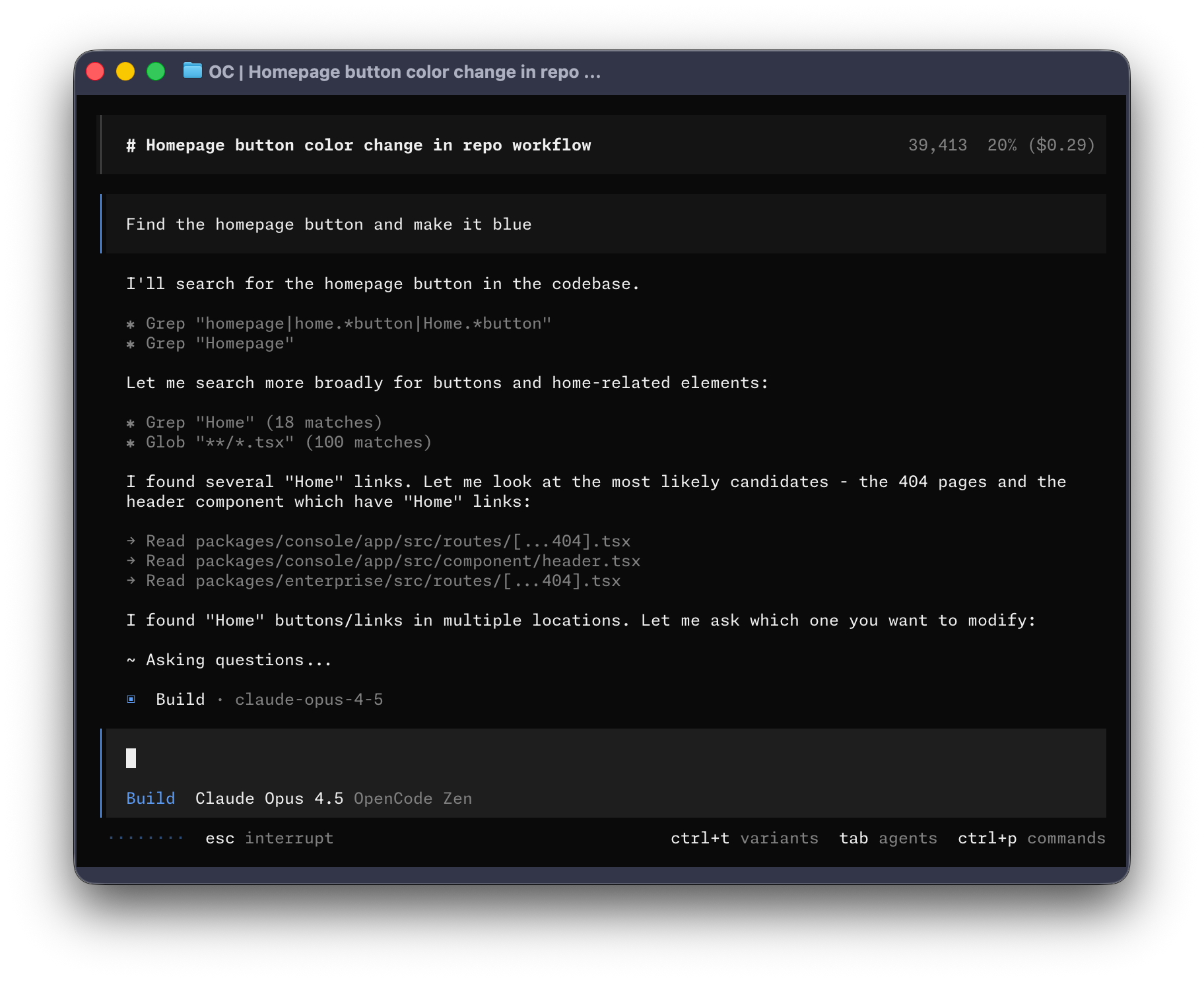
OpenCode's terminal UI. 210K GitHub stars, 950 contributors, 16M monthly active developers. Source: github.com/anomalyco/opencode
OpenCode Architecture
OpenCode: TypeScript + Effect-Based Event System (v1.18.32)
// OpenCode (anomalyco/opencode) uses Vercel AI SDK
// Client/Server architecture with Hono HTTP API
// v1.18.32 (September 2026), 210K stars, 950 contributors

// Key architectural components:
├── packages/
│   ├── core/           // Agent orchestration (TypeScript)
│   ├── tui/            // Bubble Tea terminal UI
│   ├── web/            // Desktop app (Tauri: macOS, Windows, Linux)
│   └── opencode-ai/    // Model abstraction layer
├── Model Layer: Vercel AI SDK (75+ providers)
├── HTTP API: Hono (enables mobile/remote control)
├── Events: Effect-based event system (v1.15.0)
├── Database: SQLite
├── Desktop: Tauri app with session management
├── New: DigitalOcean OAuth, NVIDIA billing, .well-known/opencode
└── Pricing: Free BYOK | Go $10/mo | Black $200/mo

// Agent modes:
// - "build": Full tool access (default)
// - "plan": Read-only, asks permission
// - "general": Subagent for complex tasks
// - "explore": Read-only codebase navigation
// - "scout": Repo research, docs lookup (v1.14.42)
Codex CLI Architecture
Codex CLI: Rust + Remote Control (v0.160.0)
// Codex CLI (openai/codex): Monolithic Rust implementation
// v0.160.0 (October 1, 2026), 91K stars, 449 contributors

// Key architectural components:
├── codex-rs/
│   ├── core/           // Agent logic + prompts
│   ├── cli/            // Terminal interface + Vim mode (v0.129)
│   ├── mcp-server/     // MCP tool server + plugin marketplace
│   └── exec/           // Command execution + sandbox hardening
├── Models: GPT-5.6 Sol (recommended), GPT-5.5, GPT-5.3-Codex-Spark
├── Cloud: Sandboxed task execution (per-task isolation)
├── Browser: Chrome extension for live browser sessions
├── Remote: codex remote-control for headless operation
├── Mobile: ChatGPT app connection to desktop Codex
├── Hooks: Pre/post-compaction hooks, /hooks browser
├── Goals: Persisted /goal workflows for multi-day tasks
├── Pricing: Plus $20/mo | Pro $100/mo | Pro $200/mo
└── Auth: Amazon Bedrock support, access tokens for CI

// Execution modes:
// - Local: Runs on user machine (Vim mode, voice input)
// - Cloud: Isolated sandbox per task
// - Remote: Headless app-server via codex remote-control
// - Browser: Chrome extension for authenticated web tasks
// - Mobile: ChatGPT app with project/file access| Component | OpenCode v1.18.32 | Codex CLI v0.160.0 |
|---|---|---|
| Primary Language | TypeScript (repo: anomalyco/opencode) | Rust (97.4%) |
| Model Abstraction | Vercel AI SDK (75+ providers) | OpenAI API + Amazon Bedrock |
| TUI Framework | Bubble Tea | Custom Rust + Vim mode |
| Remote Access | HTTP API (mobile control) | codex remote-control + ChatGPT mobile |
| Browser Integration | Not built-in | Chrome extension + in-app browser |
| Cloud Tasks | Not available | Sandboxed execution + goals |
| Desktop App | Tauri (macOS, Windows, Linux) | macOS app + system tray |
| Local Models | Native Ollama support | Not supported |
System Prompt Analysis
The system prompt is the DNA of an AI coding agent. It defines personality, capabilities, constraints, and behavior patterns. Here's how each tool approaches this critical component.
Codex CLI System Prompt
Codex CLI stores its system prompt at codex-rs/core/prompt.md with model-specific variants. GPT-5.6 Sol is now the recommended model, with GPT-5.3-Codex-Spark for real-time iteration:
Codex CLI Core System Prompt (Excerpt)
You are a coding agent running in the Codex CLI, a terminal-based
coding assistant. Codex CLI is an open source project led by OpenAI.
You are expected to be precise, safe, and helpful.

## Capabilities
- Receive user prompts and context provided by the harness
- Communicate by streaming thinking & responses
- Make and update plans for multi-step tasks
- Emit function calls to run terminal commands
- Apply patches to modify files
- Use browser via Chrome extension (authenticated sessions)
- Execute persisted /goal workflows across sessions

## Personality
The default personality is concise, direct, and friendly.
It communicates efficiently, keeping the user informed about
ongoing actions without unnecessary detail.

## Model-specific routing (as of May 2026)
// GPT-5.6 Sol: Recommended for most tasks (implementation, refactors,
//          debugging, testing, knowledge-work)
// GPT-5.4: Flagship coding model, strong reasoning + tool use
// GPT-5.4-mini: Fast/efficient for subagents and lighter tasks
// GPT-5.3-Codex-Spark: 1,000+ tok/sec real-time iteration (Pro only)
OpenCode System Prompt
OpenCode uses a modular prompt system stored in .opencode/agents/ with YAML frontmatter for configuration:
OpenCode Agent Configuration Pattern
# Example: .opencode/agents/build.md
---
name: build
description: Default agent for development work
mode: primary
model: anthropic/claude-sonnet-4
temperature: 0.7
tools:
  write: true
  edit: true
  bash: true
  webfetch: true
permission:
  edit: allow
  bash: ask
  webfetch: allow
maxSteps: 50
---

You are a coding assistant helping with software development.
Focus on writing clean, maintainable code that follows the
project's existing patterns and conventions.

When making changes:
1. Read relevant files first to understand context
2. Make minimal, focused changes
3. Run tests after modifications
4. Explain your reasoningOpenCode treats prompts as first-class configuration. Drop a markdown file in .opencode/agents/ and you have a new agent. v1.15 added a built-in customize-opencode skill for guided configuration.
Codex CLI now has a hooks system (pre/post-compaction), permission profiles replacing --full-auto, and a plugin marketplace. The core prompt is still baked into the binary, but extensibility has improved significantly since v0.128.
Tool Definitions Deep Dive
Tools are how AI agents interact with the filesystem, terminal, and external services. The tool schema design directly impacts reliability and capability.
OpenCode Built-in Tools
- read: Read file contents with optional line ranges
- write: Create or overwrite files
- edit: Apply targeted edits to existing files
- bash: Execute shell commands with permission control
- glob: Find files matching patterns
- grep: Search file contents with regex
- webfetch: Fetch and process web content
- task: Spawn subagents for complex workflows
- todo: Track task progress
- skill: Load reusable instruction sets
Codex CLI Built-in Tools
- shell: Execute terminal commands in sandbox
- apply_patch: Apply unified diff patches to files
- read_file: Read file with pagination support
- list_directory: List directory contents
- search_files: Search with rg integration
- screenshot: Capture and analyze screen content
- create_file: Create new files
- view_image: Multi-environment image rendering (v0.130)
- browser: Chrome extension for authenticated web tasks
- MCP tools: Extensible via MCP protocol + plugin marketplace
- hooks: Pre/post-compaction execution hooks (v0.129)
Tool Definition Comparison: File Editing
// OpenCode edit tool (simplified schema)
{
  "name": "edit",
  "description": "Apply targeted edits to an existing file",
  "parameters": {
    "path": { "type": "string", "description": "File path" },
    "old_string": { "type": "string", "description": "Text to find" },
    "new_string": { "type": "string", "description": "Replacement text" },
    "replace_all": { "type": "boolean", "default": false }
  }
}

// Codex CLI apply_patch tool (simplified schema)
{
  "name": "apply_patch",
  "description": "Apply unified diff patch to modify files",
  "parameters": {
    "patch": { "type": "string", "description": "Unified diff content" }
  }
}

// Key difference: OpenCode uses search-replace semantics
// Codex uses unified diff patches (more git-native)| Tool Category | OpenCode v1.18.32 | Codex CLI v0.160.0 |
|---|---|---|
| File editing approach | Search-replace + write | Unified diff patches |
| Browser automation | Not built-in | Chrome extension + in-app browser |
| MCP extensibility | Supported + MCP status monitoring | MCP server + plugin marketplace |
| Subagent spawning | Task + Scout + background subagents | Goals (multi-session, not subagents) |
| Web fetching | Built-in webfetch | Chrome extension for authenticated sites |
| Hooks/automation | Not built-in | Pre/post-compaction hooks, plugin hooks |
Agent Orchestration Patterns
How does each tool handle complex, multi-step tasks? The orchestration pattern determines whether you're working with a simple tool or a sophisticated agent system.
OpenCode: Multi-Agent Architecture
OpenCode implements a true multi-agent system with primary agents and subagents. v1.14.42 added the Scout agent for repo research, and v1.14.51 introduced experimental background subagents that keep working while you continue typing:
OpenCode Agent Hierarchy (v1.15)
// Primary Agents (switch with Tab)
├── Build Agent
│   ├── All tools enabled
│   ├── Full file system access
│   └── Default for development work
│
└── Plan Agent
    ├── Read-only by default
    ├── Denies file edits
    └── Asks permission for bash

// Subagents (invoked via Task tool or @ mention)
├── General Subagent (@general)
│   ├── Full tool access (except todo)
│   ├── For complex multi-step tasks
│   └── Runs in parallel child sessions
│
├── Explore Subagent (@explore)
│   ├── Read-only access
│   ├── Fast codebase navigation
│   └── Pattern matching and search
│
├── Scout Subagent (@scout) [NEW v1.14.42]
│   ├── Repo research, docs lookup
│   ├── Dependency-source inspection
│   └── Repository materialization
│
└── Background Subagents [EXPERIMENTAL v1.14.51]
    ├── Tasks continue while you work
    ├── Non-blocking execution
    └── Results available when ready
Codex CLI: Multi-Surface Agent with Goals
Codex CLI has evolved from a single-agent model to a multi-surface platform. The v0.128 goals system enables persisted multi-day workflows, and v0.130 adds remote-control for headless operation:
Codex CLI Task Execution Model (v0.147.0)
// Local Execution (default)
User Prompt → Agent Loop → Tool Calls → Local FS
    ↓
   Model: GPT-5.5 (recommended) or GPT-5.3-Codex-Spark (1K+ tok/sec)
   Context: 192K tokens
   Tools: Shell, file ops, MCP, plugin marketplace, hooks
   Input: Text, voice (spacebar), Vim mode (v0.129)
   Memory: Diff-based forgetting + hook-based compaction

// Goals (persisted multi-day workflows, v0.128+)
/goal "Migrate auth to OAuth2" → Stateful across sessions
    ↓
   - Survives restarts and compaction
   - Tracks progress across multiple sessions
   - Useful for migrations, QA passes, content pipelines

// Browser Execution (Chrome extension, May 2026)
Agent → Chrome Extension → Authenticated browser sessions
    ↓
   - Per-site approval controls + allowlist/blocklist
   - Operates across multiple tabs in background
   - Click, navigate, verify visual UI behavior

// Remote / Mobile Execution
codex remote-control → Headless app-server (v0.130)
ChatGPT mobile app → Connected Mac desktop (May 2026)
    ↓
   - Projects, files, credentials accessible remotely
   - Access tokens for CI automation (Enterprise)

// Cloud Execution
User Prompt → Cloud Sandbox → Isolated ContainerContext Management Strategies
Context window management is crucial for long coding sessions. Without effective context compression, agents suffer from context rot where earlier instructions degrade as the window fills. Both tools have developed distinct strategies.
| Strategy | OpenCode v1.18.32 | Codex CLI v0.160.0 |
|---|---|---|
| Max context window | Model-dependent | 192K tokens |
| Compaction strategy | Auto-summarization | Hooks-based: pre/post-compaction |
| Session persistence | Effect-based event system + pinned sessions | Goals + cloud + local |
| Multi-day workflows | Session warping with file preservation | Persisted /goal system |
| File caching | LSP integration | Intelligent pre-loading |
OpenCode includes out-of-the-box LSP (Language Server Protocol) support, automatically detecting and configuring the best tools for each language. This gives it superior code navigation and symbol awareness compared to Codex CLI's text-based approach.
Permission & Sandbox Systems
Security and permission management differ significantly between the tools.
OpenCode Permission Model
OpenCode Permission Configuration
// opencode.json permission structure
{
  "permission": {
    "edit": "allow",      // allow | ask | deny
    "bash": {
      "*": "ask",         // Default: ask for all
      "git *": "allow",   // Allow git commands
      "npm test": "allow",
      "rm -rf *": "deny"  // Block dangerous patterns
    },
    "webfetch": "allow",
    "task": {
      "general": "allow",
      "explore": "allow",
      "custom-*": "ask"
    },
    "skill": {
      "pr-review": "allow",
      "dangerous-*": "deny"
    }
  }
}
Codex CLI Sandbox Model
Codex CLI Permission Profiles (v0.128+)
// Permission profiles replaced --full-auto in v0.128
$ codex --profile default     # Ask for destructive ops
$ codex --profile permissive  # Built-in permissive defaults
$ codex --suggest             # Suggest-only, no auto-execute

// Permission profiles support:
- Built-in defaults with sandbox CLI selection
- CWD-aware controls
- Round-trip across TUI sessions and shell escalation
- Active-profile metadata for clients

// Auto-review (v0.128+)
- Eligible approval prompts route through reviewer agent
- Shows risk level before proceeding
- Pre-action review, not post-hoc

// Cloud sandbox (per-task isolation)
- Each cloud task runs in isolated container
- Pre-loaded with repo snapshot
- No access to local filesystem
- Results require explicit approval to merge

// Access tokens (Enterprise, May 2026)
- Non-interactive tokens for CI runners
- Workspace identity for trusted automation
Provider Integration Architecture
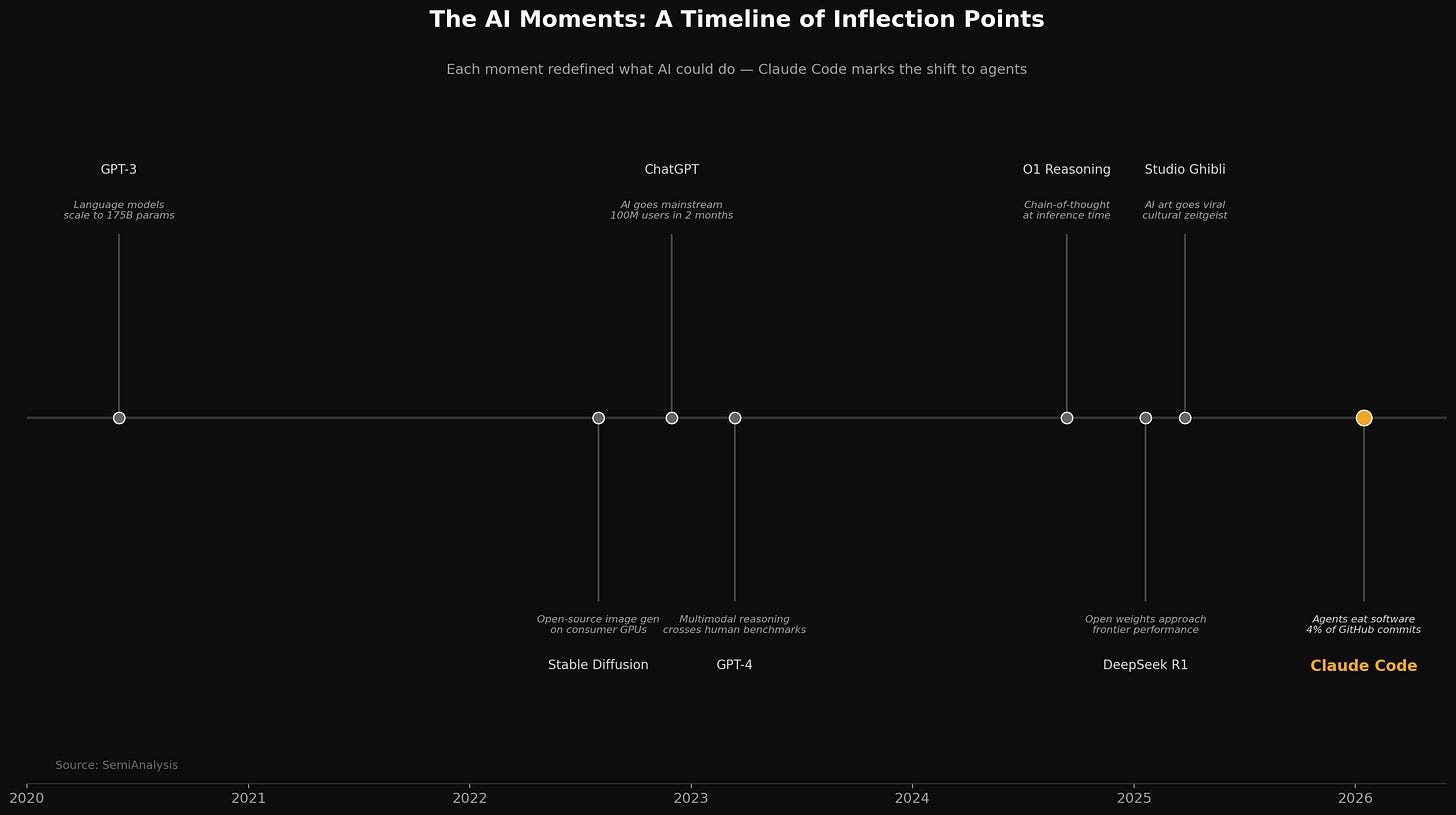
Source: SemiAnalysis. The evolution from code completion to autonomous agents. Both OpenCode and Codex are competing in the "Agent" phase.
This is the defining difference. OpenCode abstracts providers; Codex CLI optimizes for one.
OpenCode: Vercel AI SDK Abstraction
OpenCode Provider Configuration
// opencode.json provider configuration
{
  "provider": {
    "default": "anthropic/claude-sonnet-4",
    "fallback": "openai/gpt-5.4",
    "local": "ollama/codellama:34b"
  },
  "agent": {
    "build": {
      "model": "anthropic/claude-sonnet-4"
    },
    "plan": {
      "model": "openai/gpt-5.4"  // Different model for planning
    }
  }
}

// Supported providers (partial list):
// - anthropic/* (Claude models)
// - openai/* (GPT models)
// - google/* (Gemini models)
// - mistral/* (Mistral models)
// - ollama/* (Local models)
// - groq/* (Fast inference)
// - together/* (Open models)
// ... 75+ total providers
Codex CLI: Expanded Model Routing
Codex CLI Model Configuration (May 2026)
// Codex CLI model options (via ChatGPT subscription)
$ codex --model gpt-5.5              # Newest frontier: recommended for most tasks
$ codex --model gpt-5.4              # Flagship: strong reasoning + tool use
$ codex --model gpt-5.4-mini         # Fast/efficient: subagents, lighter tasks
$ codex --model gpt-5.3-codex        # Industry-leading coding for complex SE
$ codex --model gpt-5.3-codex-spark  # Real-time: 1,000+ tok/sec (Pro only)

// Config (~/.codex/config.toml)
[model]
default = "gpt-5.5"            # GPT-5.5 now recommended default
thinking_effort = "high"        # low | medium | high

// Pricing tiers (April 2026 restructure)
// Plus: $20/mo (base Codex access)
// Pro:  $100/mo (5x Plus usage, new April 2026)
// Pro:  $200/mo (20x Plus usage)

// Auth: OpenAI API key, ChatGPT session, or Amazon Bedrock
$ export OPENAI_API_KEY="sk-..."
// Or: AWS console-login credentials for Bedrock (v0.130)Codex CLI now offers five model tiers (GPT-5.5, 5.4, 5.4-mini, 5.3-Codex, Codex-Spark), plus Amazon Bedrock support as a second provider. The system prompt, tool schemas, and context strategies are tuned specifically for OpenAI model behavior. OpenCode's generic prompts work with any of 75+ providers but sacrifice model-specific optimization. The gap narrowed slightly with Bedrock support, but Codex remains fundamentally an OpenAI-first tool. OpenCode countered with DigitalOcean OAuth, NVIDIA billing headers, and a v2 model/provider API in May 2026.
Performance Benchmarks
Updated May 2026 benchmarks. GPT-5.5 is now Codex's recommended frontier model for most tasks, while GPT-5.3-Codex-Spark remains the speed champion at 1,000+ tok/sec on Cerebras WSE-3. OpenCode's model-agnostic design means benchmark results depend on your chosen provider.
| Model | Best For | Speed |
|---|---|---|
| GPT-5.5 | Complex coding, computer use, research | Standard |
| GPT-5.4 | Flagship coding, reasoning + tool use | Standard |
| GPT-5.4-mini | Subagents, lightweight tasks | Fast |
| GPT-5.3-Codex | Complex software engineering | Standard |
| GPT-5.3-Codex-Spark | Real-time iteration (Pro only) | 1,000+ tok/sec |
| Benchmark | GPT-5.3-Codex | GPT-5.6 Sol (est.) |
|---|---|---|
| SWE-bench Pro | 56.8% | Higher (no public score yet) |
| SWE-bench Verified | 80.0% | Higher (no public score yet) |
| Terminal-Bench 2.0 | 77.3% | N/A |
| Cybersecurity CTF | 77.6% | N/A |
| Inference speed (Spark) | 1,000+ tok/sec (Cerebras) | Standard speed |
| Task | OpenCode (Claude) | Codex CLI (GPT-5.5) |
|---|---|---|
| Cross-file refactor | ✓ Correct, 4m 20s | ✓ Correct, 1m 10s |
| Bug fix from stack trace | ✓ Correct, 2m 10s | ✓ Correct, 0m 45s |
| Test generation | 94 tests, 16m 20s | 73 tests, 4m 30s |
| Documentation update | ✓ Thorough, 3m | ✓ Concise, 0m 50s |
| Total benchmark time | ~26 minutes | ~7 minutes |
Codex-Spark's speed advantage on Cerebras hardware remains dramatic for real-time iteration. GPT-5.5 is the recommended model for quality-sensitive work (implementation, refactoring, debugging), while Spark targets fast feedback loops. OpenCode still generates more thorough outputs (94 vs 73 tests in generation benchmarks), and its model flexibility means you can route different tasks to different providers.
Platform Reach (May 2026)
When to Choose Each Tool
OpenCode
The community-driven multi-provider champion (210K stars)
"Maximum flexibility, 16M developers agree."
Codex CLI
OpenAI's optimized powerhouse (91K stars)
"Best-in-class for OpenAI, now with browser and mobile reach."
| Your Situation | Best Choice | Why |
|---|---|---|
| Using multiple AI providers | OpenCode | 75+ providers, DigitalOcean/NVIDIA/Bedrock |
| Committed to OpenAI ecosystem | Codex CLI | GPT-5.5 + 5 model tiers, deep integration |
| Need local model support | OpenCode | Native Ollama integration |
| Need browser automation | Codex CLI | Chrome extension + in-app browser |
| Privacy-sensitive codebase | OpenCode | No data storage, BYOK, local models |
| Mobile/remote access needed | Codex CLI | ChatGPT mobile + remote-control mode |
| Cost optimization priority | OpenCode | Free BYOK or Go at $10/mo |
| Multi-day complex workflows | Codex CLI | Persisted /goal system across sessions |
| Desktop app preferred | OpenCode | Tauri app on macOS, Windows, Linux |
| Speed is critical | Codex CLI | Codex-Spark 1,000+ tok/sec on Cerebras |
Frequently Asked Questions
Is OpenCode or Codex CLI better for coding?
Codex CLI is better if you're committed to OpenAI's ecosystem. GPT-5.6 Sol is the recommended model for most tasks, Codex-Spark runs at 1,000+ tok/sec for real-time iteration, and new features like Chrome extension, goals, and mobile access make it a full platform. OpenCode is better if you need provider flexibility (75+ providers), local model support, or want to avoid vendor lock-in. OpenCode offers Free BYOK, Go ($10/mo), and Black ($200/mo). Codex requires ChatGPT Plus ($20/mo), Pro ($100/mo, new April 2026), or Pro ($200/mo).
What's the difference between harness architectures?
Codex CLI v0.160.0 uses Rust with permission profiles, hooks system, plugin marketplace, Chrome extension for browser tasks, and remote-control mode for headless operation. OpenCode v1.18.32 uses TypeScript with an effect-based event system, Scout agent for repo research, background subagents, a desktop app via Tauri on all platforms, and 75+ provider support via Vercel AI SDK. OpenCode's design enables remote mobile control and persistent sessions.
Which has better privacy?
OpenCode has a privacy-first design that stores no code or context data, making it ideal for regulated environments. Codex CLI's cloud features and Chrome extension require data to flow through OpenAI's infrastructure. Enterprise customers can use access tokens for controlled automation. For sensitive codebases, OpenCode with local models via Ollama provides complete data sovereignty.
Can I use local models with either tool?
OpenCode natively supports local models through Ollama integration. Codex CLI added Amazon Bedrock support in v0.130, but local model support remains unavailable. This makes OpenCode the clear choice for air-gapped environments or developers wanting to avoid API costs entirely.
What's new in May 2026 for each tool?
OpenCode v1.15 (May 15) added an effect-based event system, background subagents, DigitalOcean OAuth, NVIDIA billing, MCP connection status monitoring, and pinned sessions. Codex CLI reached v0.160.0 (October 1, 2026); v0.130.0 (May 8) added the Chrome extension, remote-control mode, mobile access via ChatGPT app, Amazon Bedrock auth, hooks GA with pre/post-compaction, and Enterprise access tokens.
Supercharge Any AI Coding Agent with Morph
Whether you use OpenCode, Codex, or Claude Code—Morph Fast Apply processes your code edits 100x faster with 98% first-pass accuracy. Provider-agnostic, works with any harness.
Sources
- OpenCode GitHub Repository (anomalyco/opencode, 210K stars)
- Codex CLI GitHub Repository (openai/codex, 91K stars)
- OpenCode Changelog (v1.18.32, September 2026)
- Codex CLI Changelog (v0.160.0, October 1, 2026)
- Codex Models Documentation (GPT-5.5, GPT-5.4, Codex-Spark)
- OpenAI: Introducing GPT-5.5
- OpenCode Agent Documentation (Scout, Background Subagents)
- Codex Chrome Extension Documentation
- Codex Pricing (Plus $20, Pro $100, Pro $200)