
Why Rules Matter
LLMs have no memory between completions. Every time Cursor starts a new chat, the model has zero knowledge of your project conventions, preferred patterns, or forbidden anti-patterns. Rules fix this by injecting persistent context before every interaction.
Without rules, you repeat yourself. "Use functional components." "No default exports." "TypeScript strict mode." With rules, the model reads your standards before it reads your prompt. Teams that maintain good rules report fewer AI-generated bugs, more consistent code style, and less time spent on review comments about convention violations.
The .mdc Format
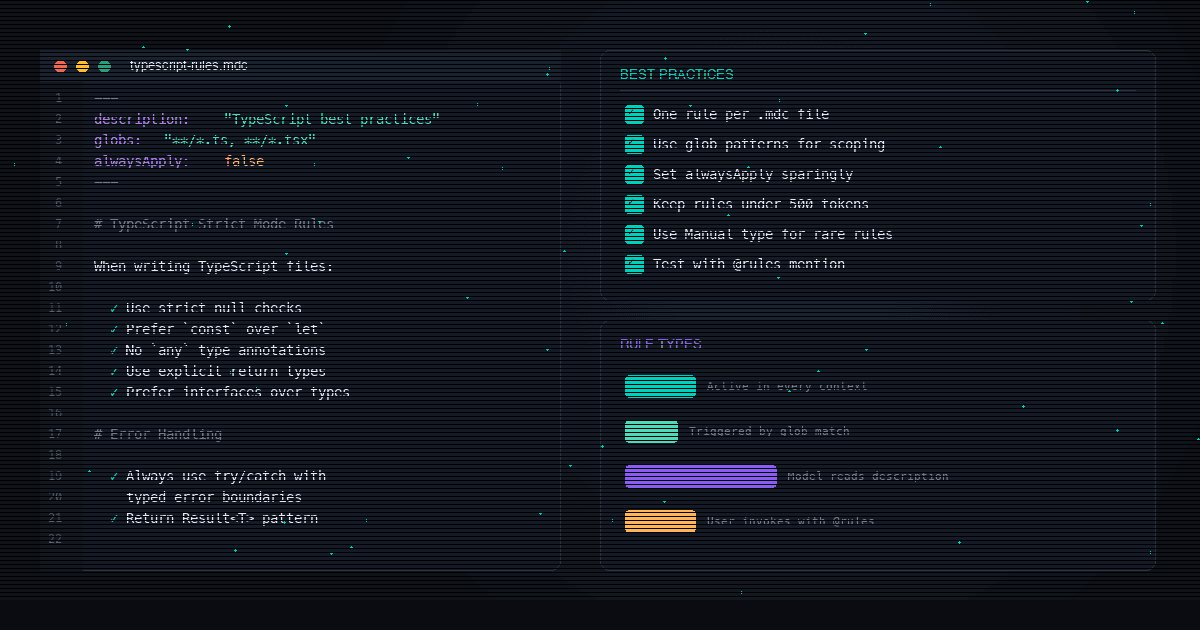
Rules live in .cursor/rules/ as .mdc files. Each file has YAML frontmatter that controls activation, followed by markdown content.
Example: .cursor/rules/typescript.mdc
---
description: "TypeScript conventions for this project"
alwaysApply: true
---

# TypeScript Standards

- Use strict mode (tsconfig strict: true)
- Prefer interfaces over type aliases for object shapes
- Use const objects instead of enums
- No default exports except for page components
- All function parameters must have explicit types
- Use early returns for error conditions
Frontmatter Fields
| Field | Type | Purpose |
|---|---|---|
| description | string | Short summary of what this rule covers. Used by the agent to decide whether to include the rule (in 'intelligent' mode). |
| alwaysApply | boolean | If true, this rule is included in every chat session regardless of context. Default: false. |
| globs | string | string[] | File patterns that trigger this rule. When files matching the glob are in context, the rule activates. Example: '**/*.tsx' |
Rules go in .cursor/rules/ at your project root. Subdirectories are supported: .cursor/rules/frontend/react.mdc works. Check these files into git so your whole team benefits.
Four Rule Types
The combination of frontmatter fields determines how a rule activates. There are four distinct modes.
| Mode | Frontmatter | When It Activates |
|---|---|---|
| Always Apply | alwaysApply: true | Every chat session. Use for universal standards (language conventions, commit format). |
| Apply Intelligently | description: "..." (no globs, alwaysApply: false) | The agent reads the description and decides if it's relevant to the current task. |
| Apply to Specific Files | globs: ["**/*.tsx"] | When files matching the pattern are in the chat context. |
| Apply Manually | No frontmatter (or alwaysApply: false, no globs) | Only when you type @rule-name in chat. |
When to Use Each Type
Always Apply
Language-level conventions (TypeScript strict mode, Python type hints), commit message format, error handling patterns. Things that apply to every file in the project.
Apply Intelligently
Architecture decisions (when to use server components vs client components), deployment rules, performance guidelines. Things the agent can match by topic.
File-Scoped (Globs)
Frontend rules for .tsx files, API route conventions for src/app/api/**, test patterns for *.test.ts. Keeps rules relevant and avoids token waste.
Manual (@mention)
Rarely-used but detailed rules: migration guides, debugging checklists, one-off refactoring patterns. Invoke with @rule-name when you need them.
File-Scoped Rule Example
---
description: "React component conventions"
globs: ["src/components/**/*.tsx", "src/app/**/*.tsx"]
---

# React Component Rules

- Use functional components with hooks
- Props interface must be defined above the component
- Name the interface [ComponentName]Props
- No inline styles. Use Tailwind classes.
- Extract components over 150 lines into subcomponents
- Use React.memo only when profiling shows a need
Intelligent Rule Example
---
description: "Database query patterns and Drizzle ORM conventions"
---

# Database Rules

- All queries go through Drizzle ORM
- Use parameterized queries exclusively
- No raw SQL strings
- Wrap multi-table operations in transactions
- Index any column used in WHERE clauses with > 10k rows
- Use select() with specific columns, not selectAll()
Best Practices
1. Start Small, Add When the Agent Repeats Mistakes
Do not write 20 rule files on day one. Start with zero rules. When the agent makes the same mistake twice, write a rule preventing it. This produces rules that address real problems, not hypothetical ones.
2. Keep Rules Under 500 Lines
Each rule consumes context window tokens. A 1,000-line rule file eats 2,000+ tokens before the model even reads your prompt. Split large rules into focused files: one for TypeScript conventions, one for API patterns, one for testing standards.
3. Reference Files, Do Not Copy Them
Point to canonical examples in your codebase instead of duplicating code in rules. "Follow the pattern in src/components/Button.tsx for all new components" stays current as the file evolves. Pasted code in rules goes stale.
4. Specify SDK Versions Explicitly
AI models mix syntax across library versions. If you are on Next.js 15, say so. If you use Drizzle ORM, specify the version. This prevents the agent from generating code that uses deprecated APIs or mixing App Router with Pages Router patterns.
Version Pinning Example
---
description: "Framework versions and compatibility rules"
alwaysApply: true
---

# Framework Versions

- Next.js 15 (App Router only, no Pages Router)
- React 19
- TypeScript 5.7 (strict mode)
- Drizzle ORM 0.38
- Tailwind CSS 4.0

Do NOT use:
- getServerSideProps (Pages Router, deprecated)
- getStaticProps (Pages Router, deprecated)
- class components (React, deprecated)
- styled-components (use Tailwind)
5. Mark Deprecated Patterns with Force
Weak: "Prefer functional components." Strong: "NEVER use class components. They are banned in this codebase. Use functional components with hooks exclusively." The agent responds to strong language. Mild preferences get ignored under ambiguity.
6. Include Verification Steps
Tell the agent how to check its own work. "After writing a new API route, verify that input validation exists for all parameters and that the response matches the TypeScript return type." This catches errors before they reach code review.
7. Check Rules Into Git
The .cursor/rules/ directory belongs in version control. When one team member writes a rule that fixes a recurring mistake, everyone benefits on the next pull. Treat rules like shared configuration, not personal preferences.
8. Use Glob Patterns to Limit Scope
A React component rule should not activate when editing a Python script. Use globs: ["**/*.tsx", "**/*.jsx"]. This saves context tokens and prevents irrelevant instructions from confusing the model.
Real Examples by Framework
TypeScript / Next.js
.cursor/rules/nextjs.mdc
---
description: "Next.js 15 App Router conventions"
alwaysApply: true
---

# Next.js 15 Rules

## Routing
- Use App Router exclusively (src/app/)
- Page components: default export only
- Layout components: default export, accept children prop
- Loading/error states: loading.tsx and error.tsx per route

## Server vs Client
- Default to server components
- Add "use client" only for interactivity, browser APIs, or hooks
- Never import server-only code in client components
- Use server actions for mutations (actions.ts files)

## Data Fetching
- Fetch data in server components, not client
- Use React cache() for request deduplication
- No useEffect for data fetching
- Pass data down as props, not through context
Python / FastAPI
.cursor/rules/python.mdc
---
description: "Python and FastAPI conventions"
globs: ["**/*.py"]
---

# Python Standards

## Style
- Type hints on all function signatures
- Use Pydantic models for request/response schemas
- Use async/await for all I/O operations
- No bare except clauses (catch specific exceptions)

## API Routes
- Group routes by domain in separate router files
- Use dependency injection for auth and database
- Return Pydantic models, not raw dicts
- Validate all input at the route boundary

## Testing
- Use pytest with async support (pytest-asyncio)
- One test file per module (test_module_name.py)
- Mock external services, never call them in tests
React Component Library
.cursor/rules/components.mdc
---
description: "React component authoring rules"
globs: ["src/components/**/*.tsx"]
---

# Component Rules

- Props interface defined above the component
- Name: [ComponentName]Props
- Functional components only (no classes)
- Use forwardRef when the component wraps a DOM element
- Extract subcomponents at 150+ lines
- Tailwind for all styling (no CSS modules, no inline styles)
- Use cn() utility for conditional classes
- Default export for page components only
- Named exports for everything else

## Example Structure
A component file should have:
1. Imports
2. Props interface
3. Component function (named export)
4. No side effects at module level
Context Budget
Every rule consumes tokens from the model's context window. Cursor uses ~128K-200K tokens of context depending on the model. Your rules, the conversation history, and the open files all compete for that space.
A typical rule file of 50 lines consumes roughly 200-400 tokens. Five "always apply" rules at 50 lines each: 1,000-2,000 tokens of overhead on every interaction. That is manageable. Twenty "always apply" rules at 200 lines each: 16,000+ tokens of overhead. That is 8-12% of the context window gone before the model reads a single line of your code.
Keep total "always apply" rules under 2,000 tokens combined. Use glob-scoped and intelligent rules for everything else. This leaves maximum context for your code and conversation.
How to Audit Your Token Usage
Count the lines in each rule file marked alwaysApply: true. Multiply total lines by ~4 (rough tokens-per-line for English text). If the number exceeds 2,000, convert some rules to glob-scoped or intelligent activation.
Common Mistakes
| Mistake | Problem | Fix |
|---|---|---|
| Monolithic .cursorrules file | Ignored by Agent mode. Eats context on every interaction. | Split into focused .mdc files in .cursor/rules/ |
| Everything set to alwaysApply | Burns 10-15% of context window on overhead | Use globs and intelligent rules for scoped content |
| Copying code into rules | Goes stale as the referenced code changes | Reference files by path: 'Follow the pattern in src/lib/auth.ts' |
| Vague instructions | 'Write clean code' gives the model nothing actionable | Be specific: 'Use early returns. Max 20 lines per function.' |
| No version pinning | AI mixes syntax across library versions | State exact versions: 'Next.js 15, React 19, Drizzle 0.38' |
| Not checking rules into git | Only one developer benefits | Commit .cursor/rules/ so the team shares standards |
Cursor Rules vs CLAUDE.md
Both serve the same purpose: injecting project standards into AI context. They target different tools.
| Feature | Cursor Rules (.mdc) | CLAUDE.md |
|---|---|---|
| Tool | Cursor IDE | Claude Code (terminal) |
| Format | .mdc with YAML frontmatter | Plain markdown |
| Location | .cursor/rules/ | Project root |
| Activation modes | 4 (always, intelligent, glob, manual) | 1 (always loaded) |
| Scope control | Glob patterns per file type | No file-level scoping |
| Works in CI | No (IDE only) | Yes (Claude Code GitHub Actions reads it) |
If your team uses both Cursor and Claude Code, maintain both files. The content can overlap, but the format differs. Some teams generate one from the other as a build step.
For teams evaluating both tools, see our Claude Code vs Cursor comparison for a detailed breakdown of when each tool makes sense.
FAQ
Where do Cursor rules go?
Modern rules: .cursor/rules/ as .mdc files. Legacy format: .cursorrules in the project root (deprecated, ignored by Agent mode). User-level rules: Cursor Settings > General > Rules for AI.
What is the .mdc format?
Markdown with YAML frontmatter. Three frontmatter fields: description (summary for intelligent matching), alwaysApply (boolean for universal activation), and globs (file patterns for scoped activation). The body is markdown.
Is .cursorrules deprecated?
Yes. It still works for basic completions but is ignored by Agent mode. Cursor recommends migrating to .mdc files in .cursor/rules/.
How long should rules be?
Under 500 lines per file. Total "always apply" rules should stay under 2,000 tokens combined. Split large rule sets into focused files.
Do rules work with Cursor Tab?
No. Rules apply to Agent Chat only. They do not affect Cursor Tab (autocomplete), Inline Edit (Cmd/Ctrl+K), or other AI features.
What is the precedence order?
Team Rules (highest) > Project Rules (.cursor/rules/) > User Rules (Cursor Settings). When multiple rules match, all are included in context.
What is the difference between Cursor rules and CLAUDE.md?
Cursor rules are for Cursor IDE. CLAUDE.md is for Claude Code (terminal agent). Same purpose, different tools. If you use both, maintain both files. See our MDC rules technical guide for the full format specification.
Can I use AGENTS.md instead?
Cursor supports AGENTS.md as a plain markdown alternative to .mdc files. It goes in the project root or subdirectories. It does not support the YAML frontmatter features (activation modes, glob scoping), so it always applies. Good for simple projects, but .mdc gives you more control.
Faster edits, any coding tool
Morph's fast-apply model works with Cursor, Claude Code, and any AI coding tool. Apply code changes 60-80% faster with fewer tokens.