
Cursor Pro costs $20/mo. Actual spend for heavy users runs $40-50/mo after overages. The tool locks you into a VS Code fork, and tightens usage limits every quarter.
We tested 7 alternatives on real codebases. One free tool (Cline + Claude API) scored 80.8% SWE-bench Verified. A $10/mo option runs Claude, Codex, and Copilot agents simultaneously. Below: pricing, benchmarks, and which tool fits your workflow.
SWE-bench Verified Scores (March 2026)
Higher is better. Cursor has not published a SWE-bench score.
Cline is BYOK: its SWE-bench score depends on the underlying model. Score shown uses Claude Opus 4.6 via API.
Quick Comparison: Cursor Alternatives at a Glance
| Tool | Monthly Cost | SWE-bench | Editors | Verdict |
|---|---|---|---|---|
| Claude Code | $20 Pro | 80.8% | VS Code, Terminal | Best agent orchestration |
| Cline | Free (BYOK) | Model-dependent | VS Code, JetBrains, Neovim, Zed | Best free option |
| GitHub Copilot | $10 Pro | ~55% | VS Code, JetBrains, Neovim, Xcode | Best multi-agent hub |
| Windsurf | $15 Pro | Not published | Windsurf fork | Cheapest paid, uncertain future |
| OpenAI Codex | $20 Plus | 69.2% | VS Code, Terminal | Best task isolation |
| Zed | Free / $10 Pro | N/A (hosts agents) | Zed only | Fastest editor |
| Google Antigravity | Free (preview) | Not published | Antigravity only | Visual agent management |
Monthly Cost Comparison (Paid Tier)
Lower is better. Cline is free (you pay API costs separately).
Cursor heavy users report $40-50/mo after overages. Cline API costs vary by model and usage.
Why Developers Leave Cursor
Cursor still works. But the complaints are consistent across Reddit, forums, and our user interviews. Four issues come up repeatedly:
Pricing overages
Base plan is $20/mo. Heavy usage pushes actual spend to $40-50/mo. Cloud Agents are billed separately. Usage limits tighten every quarter, making monthly costs unpredictable.
Stability problems
Crashes, file-saving failures, and the AI modifying wrong files without permission. These compound when you depend on the tool for production work.
VS Code fork lock-in
Cursor is a proprietary fork. Your workflows, keybindings, and extensions are tied to Cursor's release cycle. Switching to JetBrains, Neovim, or standard VS Code means losing AI features.
Privacy gaps
Code is sent to third-party APIs. No local model support. No guaranteed data isolation. For teams with sensitive codebases, this is a non-starter.
1. Claude Code: Best for Agent Orchestration and Code Quality
Claude Code is a terminal-native coding agent with a VS Code extension. The core difference from Cursor: Agent Teams spin up coordinated sub-agents that share a task list, send messages to each other, and track dependencies. Cursor's subagents run in parallel but cannot communicate.
Claude Opus 4.6 scores 80.8% on SWE-bench Verified, the highest published score among coding agents. It runs in your terminal or inside VS Code, with hooks, auto-memory, and MCP tool integration.
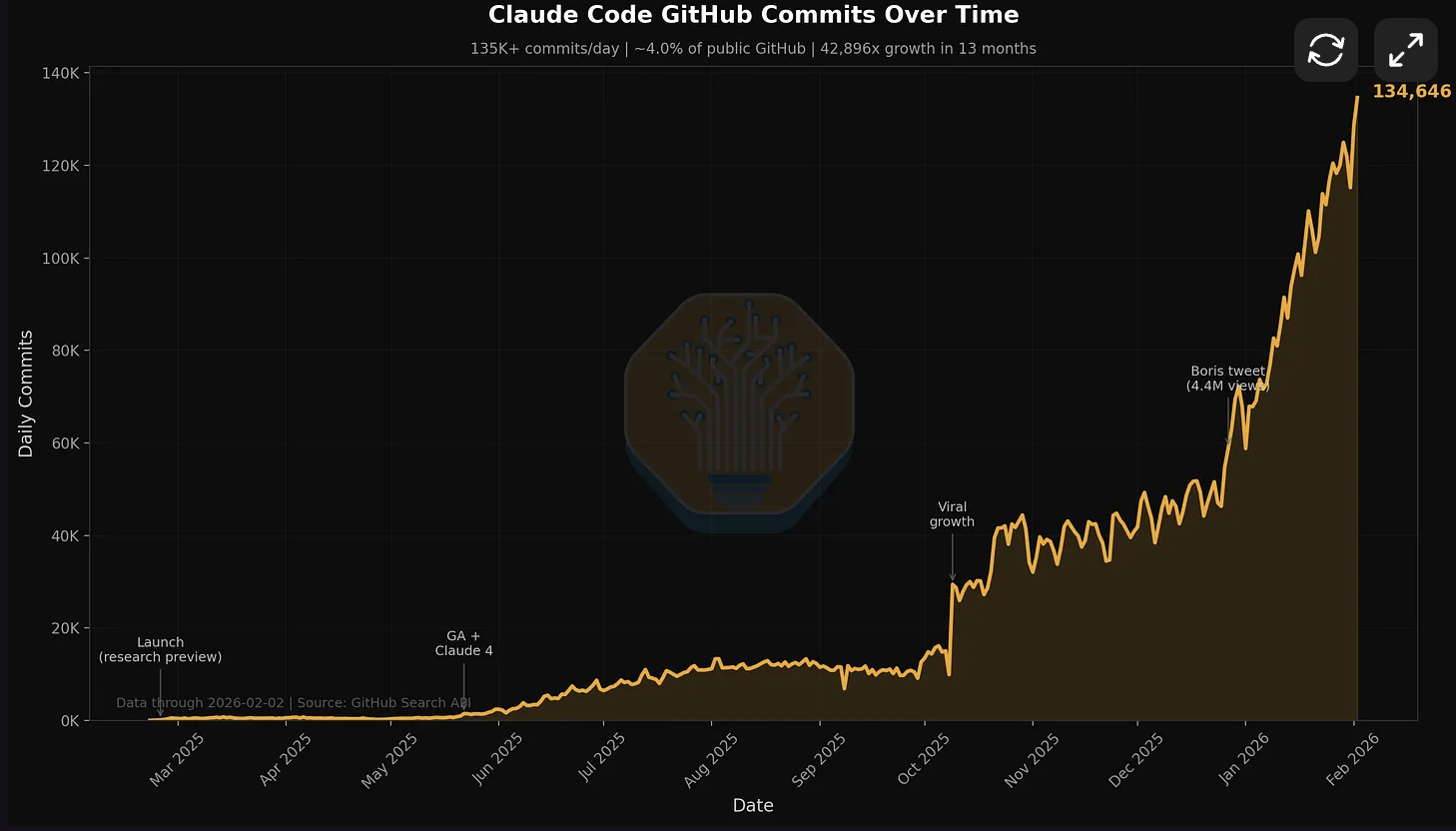
Claude Code adoption growth. Source: SemiAnalysis / GitHub data.
Pros
- Highest published SWE-bench score (80.8% Verified) among coding agents
- Agent Teams: sub-agents coordinate via shared task lists and bidirectional messaging
- Works in VS Code and any terminal, not locked to a proprietary editor
- Extensible with hooks, Agent SDK, MCP servers, and auto-memory
Cons
- No tab completions (Cursor's inline completions are faster for small edits)
- Terminal-first workflow has a learning curve for developers used to GUI-based tools
- Max plan ($200/mo for 20x usage) costs the same as Cursor Ultra
Verdict: Best choice if you work on large codebases, need agents that coordinate across tasks, or prioritize code quality benchmarks. Not ideal if tab completions drive most of your AI usage.
| Aspect | Claude Code | Cursor v2.5 |
|---|---|---|
| SWE-bench Verified | 80.8% | Not published |
| Agent coordination | Shared task list + messaging | Independent parallel workers |
| Editor support | VS Code, Terminal | Cursor only |
| Tab completions | Not available | Sub-second, specialized |
| Extensibility | Hooks, Agent SDK, MCP, auto-memory | Plugin Marketplace |
| Starting price | $20/mo (Pro) | $20/mo (Pro) |
2. Windsurf: Budget Alternative with an Uncertain Future
Windsurf (formerly Codeium) is a VS Code fork at $15/mo, the cheapest paid Cursor alternative. In February 2026, Cognition (Devin) signed a $250M acquisition deal. The product still works, but the roadmap now depends on Cognition's plans.
Wave 14 shipped Arena Mode for blind model comparison, Plan Mode for structured agent workflows, and direct Devin integration. SWE-grep uses RL-trained models for faster code retrieval than frontier models.

Windsurf IDE interface.
Pros
- Cheapest paid option at $15/mo ($15/user Teams, reduced from $30)
- SWE-grep: RL-trained code retrieval, faster than standard model-based search
- Direct Devin integration for long-running autonomous tasks
- Arena Mode lets you compare models blind before committing to one
Cons
- Cognition acquisition creates uncertainty about the product roadmap
- Still a VS Code fork, so you are trading one lock-in for another
- Smaller community and plugin ecosystem than Cursor
Verdict: Good pick if price is your top concern and you want Devin integration. Watch the acquisition closely before committing long-term.
3. GitHub Copilot: Broadest Editor Support and Multi-Agent Platform
Copilot is no longer an autocomplete extension. VS Code 1.109 runs Claude, Codex, and Copilot agents side by side under one $10/mo subscription. Each agent gets its own context window. Subtasks do not count against the main agent's token limit. The Copilot Coding Agent works autonomously in isolated dev environments.
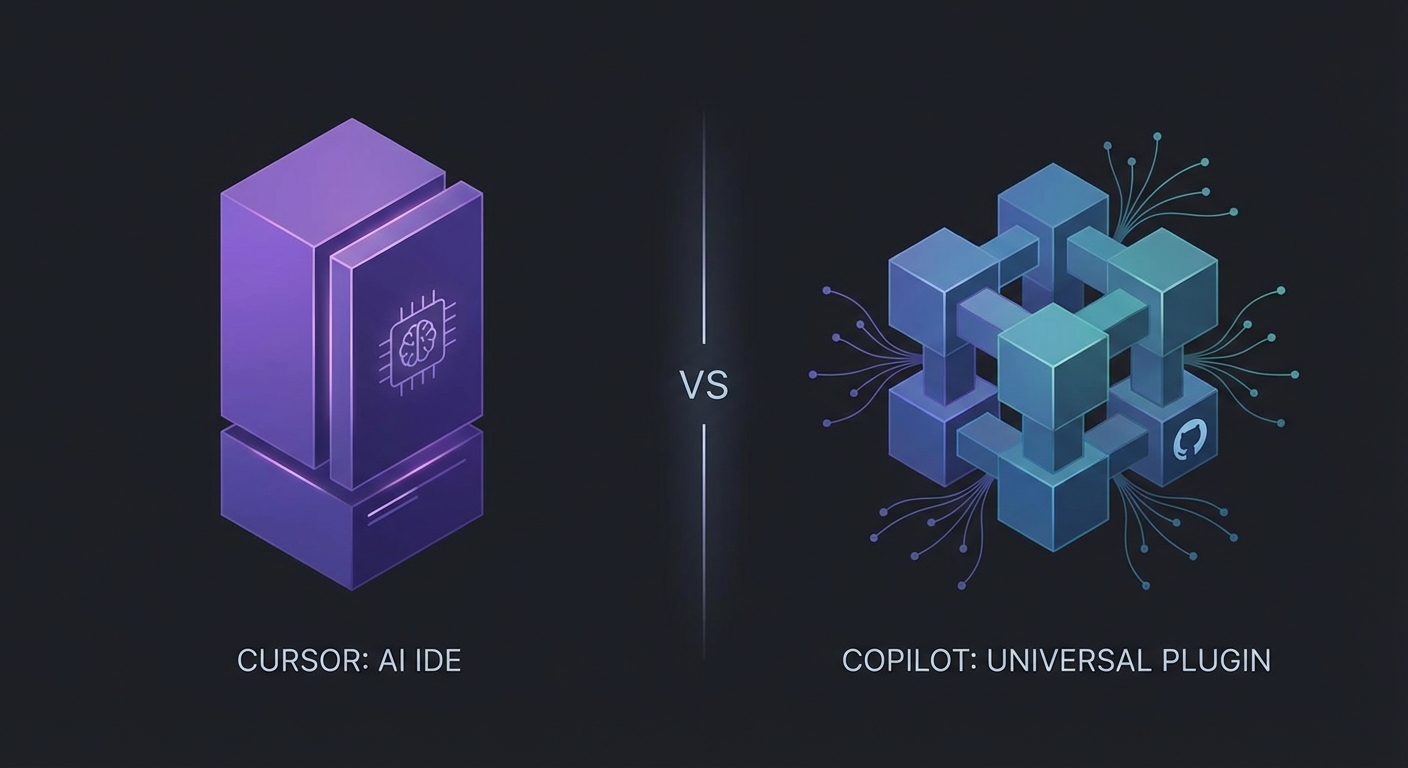
Copilot in VS Code with multi-agent support.
Pros
- Works in VS Code, JetBrains, Neovim, and Xcode (widest editor support)
- Run Claude, Codex, and Copilot agents under one subscription
- Cheapest paid tier at $10/mo Pro (vs Cursor's $20/mo)
- Native AI-powered PR review built into the GitHub workflow
Cons
- Individual agents are not as deep as Cursor's or Claude Code's native implementations
- Free tier limited to 50 premium requests/month
- Extra requests at $0.04 each can add up for heavy users
Verdict: Best choice if you want one subscription that runs multiple agent types across multiple editors. Especially strong if you already live in the GitHub ecosystem.
| Feature | GitHub Copilot | Cursor v2.5 |
|---|---|---|
| Price (individual) | Free / $10 Pro / $39 Pro+ | $20 Pro / $200 Ultra |
| Editor support | VS Code, JetBrains, Neovim, Xcode | Cursor only |
| Multi-agent | Copilot + Claude + Codex in one editor | Cursor agents only |
| Code review | Native AI PR review | Not available |
| Background agents | Isolated workspaces, simultaneous | Cloud Agents (25-52+ hrs) |
4. Cline: Best Free and Open-Source Option
Cline is an open-source (Apache-2.0) VS Code extension with native subagents and a headless CLI mode. You bring your own API key, so the tool itself is free. Native subagents spin up parallel workers with dedicated context per task. CLI 2.0 adds headless mode for CI/CD pipelines: run agents with auto-approval and structured JSON output.

Cline running in VS Code with native subagent support.
Pros
- Completely free (pay only for API usage with your own key)
- Open source with an active community (Apache-2.0 license)
- Works in VS Code, JetBrains, Neovim, and Zed
- CLI 2.0 headless mode for CI/CD automation with auto-approval flags
Cons
- No tab completions (Cursor's autocomplete is much faster for small edits)
- API costs can exceed a Cursor subscription for heavy users
- Setup requires configuring your own API keys and model preferences
Verdict: Best free alternative, period. Especially strong for teams that want open-source transparency, CI/CD agent automation, or the freedom to pick any model provider.
| Aspect | Cline | Cursor v2.5 |
|---|---|---|
| Price | Free (pay for API only) | $20-$200/mo |
| Open source | Yes (Apache-2.0) | No |
| Headless/CI mode | Yes (CLI 2.0) | No |
| Editor support | VS Code, JetBrains, Neovim, Zed | Cursor only |
| Tab completions | Not available | Sub-second, specialized |
5. OpenAI Codex: Best for Isolated Cloud Sandboxes
Codex takes a different approach from every other tool on this list. Each task runs in a cloud container with internet access disabled. No cross-task contamination is possible. You write a spec, submit it, and Codex works in isolation, then delivers the result. This makes it the strongest option for security-sensitive codebases or teams that want guaranteed separation between tasks.
The Rust-native CLI rewrite improved speed significantly, and the Codex App ships with MCP shortcuts for tool integration. GPT-5.3-Codex-Spark runs on Cerebras hardware for fast inference.

Codex CLI with cloud sandbox isolation.
Pros
- Strongest task isolation: network-disabled containers per task
- Open source (Apache-2.0, Rust rewrite)
- Fast inference on Cerebras hardware
- Codex App with MCP shortcuts for tool integration
Cons
- Async-only workflow: you submit tasks and wait, no real-time interaction
- Network isolation means tasks cannot fetch dependencies or call APIs during execution
- Requires ChatGPT Plus ($20/mo) for full access
Verdict: Best for security-conscious teams or anyone who prefers writing specs and reviewing results over real-time pair-programming with an AI. Not for developers who want interactive, inline assistance.
6. Zed: Fastest Editor with Agent Hosting
Zed made a bet: instead of building its own AI agent, it created the Agent Client Protocol (ACP), an open standard that lets external agents (Claude Code, Codex, Gemini CLI) run inside Zed with full editor integration. You get a Rust-powered, GPU-accelerated editor with instant startup, and you pick which agent to run inside it.
Pros
- Fastest editor available (Rust, GPU-accelerated, instant startup)
- ACP lets you run any external agent with full editor integration
- Free and open source (GPL license)
- Agent Panel with side-by-side diffs and per-tool permissions
Cons
- Zed's own AI features (Edit Predictions, hosted models) are less mature than Cursor's
- Smaller extension ecosystem than VS Code
- You are betting on the ACP ecosystem growing
Verdict: Best for developers who want peak editor performance and the flexibility to plug in any agent. Not for those who want a single, fully integrated AI IDE experience out of the box.
Pricing
Free (editor + open source) or Pro ($10/mo) with hosted models, $5/mo token credits, and unlimited edit predictions. Default max spend is $20/mo total.
7. Google Antigravity: Agent-First IDE with Visual Management
Google Antigravity is a new IDE built around multi-agent workflows from the ground up. Its distinguishing feature is the Manager view: a dashboard where you orchestrate multiple parallel agents, watch them work, and review their output. No other IDE gives you this kind of visual control over concurrent agent tasks.
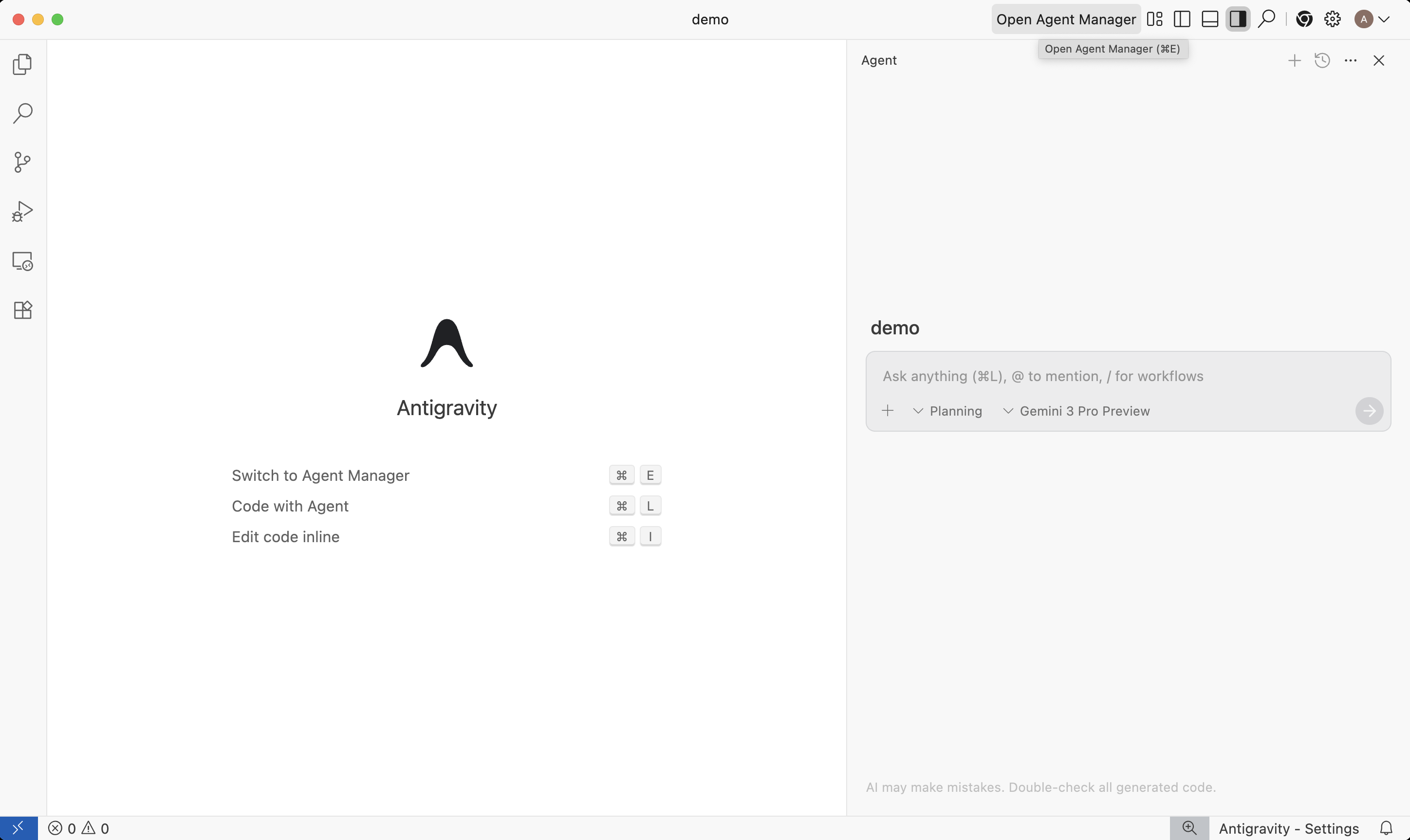
Google Antigravity: Editor view with Agent Manager panel. Source: Google Developers Blog.
Pros
- Manager view for orchestrating parallel agents visually
- Artifacts system: agents produce screenshots, recordings, and task lists for verification
- Supports Gemini, Claude, and GPT models
- Free during public preview
Cons
- Brand new, unproven at scale
- No established plugin ecosystem
- Pricing after preview is unknown
Verdict: Worth trying if you want visual agent management and are comfortable with an early-stage tool. The free preview makes it zero risk to experiment.
Notable Mention: Void
Void was an open-source, privacy-first VS Code fork with local model support. As of early 2026, development is paused. If privacy is your priority, Cline (open source, works with local models via Ollama, has native subagents) is the active alternative.
Pricing Comparison: Every Cursor Alternative
| Tool | Free Tier | Pro/Paid | Premium/Max |
|---|---|---|---|
| Cursor | 50 premium requests | $20/mo (Pro) | $200/mo (Ultra) |
| Claude Code | Limited free | $20/mo (Pro) | $100 (Max 5x) / $200 (Max 20x) |
| Windsurf | 25 credits/mo | $15/mo (Pro) | $15/user Teams / $60/user Enterprise |
| GitHub Copilot | 50 premium requests | $10/mo (Pro) | $39/mo (Pro+) / $39/user Enterprise |
| Cline | Free (BYOK) | N/A (pay for API) | CLI 2.0 also free |
| Codex | Limited free | $8/mo (Go) / $20 (Plus) | $200/mo (Pro) |
| Zed | Free (open source) | $10/mo (Pro) | Max $20/mo total |
| Google Antigravity | Free (public preview) | TBD | TBD |
Total Cost with Heavy Agent Usage
Agent-heavy workflows change the cost equation. Each sub-agent burns through your token budget, so a run with 3 agents uses roughly 3x the tokens of a single-agent run. Codex bundles cloud sandboxes with ChatGPT subscriptions at no extra per-sandbox cost. Copilot charges $0.04 per extra premium request. Cline is free but your API bill scales with usage. For heavy agent users, Codex's flat-rate inclusion with ChatGPT Plus ($20) or Copilot Pro ($10) offer the best per-dollar value.
Decision Framework: Pick Your Cursor Alternative
| Your Priority | Best Alternative | Why |
|---|---|---|
| Agent orchestration | Claude Code | Agent Teams with shared task lists and messaging between agents |
| Task isolation / security | OpenAI Codex | Network-disabled cloud sandboxes per task |
| Multi-editor support | GitHub Copilot | Works in VS Code, JetBrains, Neovim, Xcode |
| Free / open source | Cline | Apache-2.0, BYOK, works in every major editor |
| Lowest paid price | Copilot ($10/mo) or Windsurf ($15/mo) | Both cheaper than Cursor's $20/mo Pro |
| Editor performance | Zed | Rust + GPU-accelerated, hosts any agent via ACP |
| Visual agent management | Google Antigravity | Manager view for parallel agent orchestration |
| Privacy / local models | Cline | Open source, works with Ollama and local models |
| CI/CD automation | Cline | CLI 2.0 headless mode with auto-approval and JSON output |
| Highest code quality | Claude Code | 80.8% SWE-bench Verified, highest published score |
Frequently Asked Questions
What is the best Cursor alternative in 2026?
It depends on what is driving you away from Cursor. If pricing is the issue, Copilot ($10/mo) and Cline (free) cost less. If you need deeper agent coordination, Claude Code's Agent Teams are the most capable. If you want task isolation for security, Codex's cloud sandboxes are the strongest. If editor lock-in is the problem, Copilot and Cline work across VS Code, JetBrains, and Neovim.
Is there a free alternative to Cursor?
Yes. Cline is free and open-source with native subagents. Google Antigravity is free during its public preview. Copilot has a free tier with 50 premium requests/month. Zed is a free, open-source editor that hosts external AI agents.
Is Claude Code better than Cursor?
Claude Code scores higher on benchmarks (80.8% SWE-bench Verified) and its Agent Teams let sub-agents coordinate with shared task lists and messaging. Cursor has better tab completions, visual inline diffs, and a Plugin Marketplace with integrations for Amplitude, AWS, Figma, Linear, and Stripe. Claude Code works in VS Code and the terminal; Cursor requires its own fork. See our full comparison.
Can I use Cursor alternatives with VS Code?
Yes. Claude Code, GitHub Copilot, and Cline all work as VS Code extensions. VS Code 1.109 runs Claude, Codex, and Copilot agents natively. Only Windsurf and Cursor require their own VS Code forks.
Why are developers switching away from Cursor?
The most common complaints: surprise pricing overages beyond the base subscription, bugs (crashes, file-saving failures), the AI modifying wrong files without permission, privacy concerns about code sent to third-party APIs, and being locked into a VS Code fork.
Boost Any Tool's SWE-bench by ~4% with WarpGrep
WarpGrep is an agentic code search tool that improves any AI coding agent's SWE-bench performance by ~4%. It works as an MCP server inside Claude Code, Cursor, Windsurf, Codex, and any tool that supports MCP. Better search = better context = better code.