
The strongest Claude Code alternatives in September 2026 are Codex (GPT-5.6 Terra by default, CLI rust-v0.154.0), Cursor at $20/mo, OpenCode (v1.18.30, 202K GitHub stars, 75+ providers, free), Cline (v4.1.16, BYOK inside VS Code), and GitHub Copilot Pro at $10/mo with 1,500 AI credits. Claude Code itself ships v2.1.270 and runs Claude Opus 5 at $5 in / $25 out per million tokens with a 1M-token context, included in Claude Pro at $20/mo and Max from $100/mo. Two names on older lists are gone: Gemini CLI stopped serving Google AI Pro, Ultra, and free individual accounts on June 18, 2026 and is replaced by Antigravity CLI, and Windsurf now ships as Devin Desktop under Cognition. Aider still runs but has not tagged a release since v0.86.1. Release versions were checked against the vendor GitHub release feeds on September 13, 2026; prices and plan names were checked on August 30, 2026.
- Best for IDE users: Cursor ($20/mo, multi-model, Cloud Agents, Plugin Marketplace)
- Best free / open-source: Aider (BYOK, any model, zero markup) or Cline (VS Code agent, BYOK)
- Best for autonomy: OpenAI Codex (GPT-5.6 Sol/Terra/Luna, cloud sandbox, Rust CLI)
- Best for enterprise: GitHub Copilot ($10/mo Pro with 1,500 AI credits, SSO, Autopilot mode)
- Best value: OpenCode (free tool, 75+ providers, pay only for tokens with no markup)
- Best free / Google stack: Antigravity CLI (the Gemini CLI replacement, shares the Antigravity 2.0 agent harness)
All 11 Alternatives at a Glance
| Tool | Type | Model Support | Starting Price |
|---|---|---|---|
| Cursor | IDE (VS Code fork) | Grok 4.6, Composer 2.5, Claude, GPT, Gemini | $20/mo |
| OpenAI Codex | Terminal + cloud + Chrome | GPT-5.6 Sol / Terra / Luna | $20/mo (ChatGPT Plus) |
| Aider | Terminal | Any model, any provider | Free (BYOK) |
| Cline | VS Code + CLI | Any model via API | Free (BYOK) |
| GitHub Copilot | IDE + CLI + web | GPT, Claude, Gemini, Kimi, BYOK | $10/mo (1,500 credits) |
| Devin Desktop (was Windsurf) | IDE (Cognition) | SWE 1.7, Claude, GPT, Gemini | $20/mo |
| OpenCode | Terminal + Desktop + IDE | 75+ providers | Free (BYOK) |
| Antigravity CLI (was Gemini CLI) | Terminal | Gemini, shared Antigravity harness | Free tier |
| Google Antigravity | Agent-first IDE | Gemini, AgentKit 2.0 | Free tier + Pro |
| Amazon Q / Kiro | IDE + CLI | Amazon + frontier Claude models (Kiro) | Free tier |
| Continue.dev | CI/CD + IDE extension | Any model, fully open | Free (open source) |
Claude Code Alternatives by Version, Release Date, and Price (September 2026)
Roundups on this topic go stale fast because the terminal agents cut releases several times a week. The table below records the release each tool was at when this page was last checked, so you can tell how far the tool has moved since. Claude Code sits in the first row for reference.
| Tool | Latest release | Released | Open source | Price |
|---|---|---|---|---|
| Claude Code (reference) | v2.1.270 | Sep 12, 2026 | No | Claude Pro $20/mo, Max from $100/mo |
| OpenAI Codex CLI | rust-v0.154.0 | Sep 9, 2026 | Yes (CLI) | ChatGPT Plus $20/mo, Pro for 5x-20x limits |
| OpenCode | v1.18.30 | Sep 9, 2026 | Yes | Free, BYOK |
| Cline | Extension v4.1.16 (Aug 30 check), desktop app v0.0.26 | Sep 11, 2026 (desktop) | Yes | Free, BYOK |
| Aider | v0.86.1 | No tag since v0.86.1 | Yes | Free, BYOK |
| Cursor | Continuous (IDE auto-updates) | Weekly | No | $20/mo |
| GitHub Copilot | Continuous (IDE extension) | Weekly | No | $10/mo Pro, 1,500 AI credits |
| Devin Desktop (was Windsurf) | Continuous | Weekly | No | $20/mo |
| Antigravity CLI (was Gemini CLI) | Continuous | Weekly | No | Free tier |
Two takeaways from the release cadence. The open-source terminal agents (Codex CLI, OpenCode, Cline) shipped within four days of each other in the second week of September, and each tags a release roughly every one to three days, so a version number quoted in a roundup from spring 2026 is dozens of releases behind. Aider is the exception: it still works and is still free, but it has not tagged a release since v0.86.1, which matters if you depend on new model IDs landing quickly.
Decision Framework: Pick Your Alternative
| Your Situation | Best Alternative | Why |
|---|---|---|
| Want an IDE, not terminal | Cursor | Cloud Agents, Plugin Marketplace, Teams integration, $2B ARR |
| Budget under $20/mo | Cline or OpenCode + local model | Free tool + free inference via Ollama |
| Need model flexibility | OpenCode or Cline | Use any model from any provider, switch mid-session |
| Enterprise team | GitHub Copilot | SSO, audit logs, Autopilot mode, pooled AI credits |
| Maximum autonomy | OpenAI Codex | GPT-5.6 family, Chrome extension, cloud sandbox |
| Google-stack terminal agent | Antigravity CLI | Replaces Gemini CLI, same harness as Antigravity 2.0 |
| VS Code + full agent | Cline | Auto model routing, enterprise skills, 67K+ GitHub stars |
| Multi-agent orchestration | Google Antigravity | AgentKit 2.0, A2A protocol, unified permissions |
| Privacy-first / offline | OpenCode + Ollama | 202K GitHub stars, desktop app, runs 100% locally |
| AWS-heavy stack | Amazon Q / Kiro | Infrastructure-aware AI, frontier Claude models on Kiro |
| Task-driven team workflow | Devin Desktop | Agent Command Center, Spaces, Devin Cloud handoff |
Why Developers Leave Claude Code
Claude Code is excellent. It ships weekly (v2.1.270 on September 12, 2026; v2.1.251 on August 28 added model-switch hooks, live subagent streaming to Remote Control clients, and a spend-limit bar in /usage), and it runs Anthropic's current lineup led by Claude Opus 5 with a 1M-token context. But three constraints consistently push power users toward alternatives.
Usage Limits That Punish Power Users
Claude Code is bundled into Claude Pro at $20/mo ($17/mo billed annually), which gives most developers 10-20 meaningful coding sessions per week. Heavy users report hitting limits by midweek. Max starts at $100/mo and sells 5x or 20x Pro usage, so relief is bought in fixed multiples rather than measured capacity.
Model Lock-In
Claude Code runs Anthropic models exclusively: Claude Fable 5 ($10/$50 per M tokens), Claude Opus 5 ($5/$25), Claude Sonnet 5 ($2/$10), and Claude Haiku 4.5 ($1/$5). You cannot swap in GPT-5.6, Gemini 3.1 Pro, or DeepSeek when Claude struggles with a particular task type. Every other major alternative supports multiple model providers.
Token Overhead
Claude "thinks out loud" extensively, which improves accuracy but burns through allocations faster. Adaptive thinking is always on for Fable 5 and defaults to high effort on Opus 5 and Sonnet 5, and the tokenizer introduced with Opus 4.7 maps the same text to more tokens than earlier generations. This verbosity is partly why limits feel so tight.
The question is not whether Claude Code is good. The question is whether its constraints match your workflow. If you need model flexibility, predictable costs, or IDE integration, the alternatives below address each gap specifically.
Terminal Agent Alternatives
These tools share Claude Code's terminal-native philosophy: they run in your command line, edit files, execute shell commands, and work alongside your existing editor.
1. OpenAI Codex: GPT-5.6 with Cloud Sandbox
Codex is OpenAI's terminal-native coding agent, built in Rust (current CLI release rust-v0.154.0, September 9, 2026). Each cloud task runs in a network-disabled container. The GPT-5.6 family is the model set: Sol for the hardest reasoning, Terra as the everyday default, Luna for high-volume work. GPT-5.3-Codex-Spark is a research-preview low-latency model, ChatGPT Pro only.
Usage limits are published per model and per plan: Plus gets 20-110 Terra messages per rolling five hours, Pro 5x gets 100-550, Pro 20x gets 400-2,200, and local messages share that window with cloud chats. Plus and Pro users can buy ChatGPT credits instead of upgrading, and an API key runs Codex locally at standard API rates with no cloud features.
Beats Claude Code: Published per-model usage limits, three price/latency tiers in one plan, Chrome extension, cloud sandbox isolation, credit top-ups without a plan change, API-key mode for CI.
Falls short: No Agent Teams, locked to OpenAI models, outputs can vary between runs on the same prompt, no hooks system.
Full Codex vs Claude Code comparison →
2. Aider: The Git-Native Veteran
Aider has been around longer than most tools on this list: 48.6K GitHub stars and a community that has stress-tested it across every language and framework combination you can think of. Development has slowed sharply. The newest tagged release is still v0.86.1 from August 2025, and the repository's last push was May 22, 2026.
Aider maps your entire codebase, creates conventional Git commits automatically, and supports any LLM provider. Its architect mode sends requests through two models: an architect proposes changes, an editor translates proposals into file edits. Watch mode monitors files and responds to AI comments you add in any editor. Model coverage now lags the frontier: the unreleased main branch documents Claude 4.5/4.6 and GPT-5.4 support, so Opus 5, Sonnet 5, and the GPT-5.6 family need manual model metadata.
Beats Claude Code: Free, works with any model (OpenAI, Anthropic, Google, DeepSeek, local via Ollama), automatic Git commits, architect mode for two-model pipelines, voice-to-code input.
Falls short: No tagged release in a year and no repository activity since May 2026, terminal-only interface with a steeper learning curve, no subagents, no MCP support, context management requires more manual attention.
Aider: Getting Started
# Install
pip install aider-chat

# Use with Claude Opus 5
export ANTHROPIC_API_KEY=sk-...
aider --model claude-opus-5

# Use with local model (free)
aider --model ollama/deepseek-coder-v2

# Add files and start coding
aider src/auth.ts src/middleware.ts
> Add rate limiting to the auth middleware
3. Gemini CLI, Now Antigravity CLI: The Google Terminal Agent
Google retired Gemini CLI as its consumer terminal agent. On May 19, 2026 it announced the transition to Antigravity CLI (the agy binary), and on June 18, 2026 Gemini CLI and the Gemini Code Assist IDE extensions stopped serving requests for Google AI Pro, Ultra, and free individual accounts. Organizations on Gemini Code Assist Standard or Enterprise licenses keep their existing Gemini CLI access.
Antigravity CLI runs the same agent harness as the Antigravity 2.0 IDE, shares its settings and permissions, and can hand conversations to the IDE through the @conversation dropdown. It carried over the features people used Gemini CLI for: Agent Skills, hooks, subagents, and extensions (now plugins). Migration is built in: running agy in a directory with legacy config offers a conversion checklist, and agy plugin import gemini converts Gemini extensions. Workspace skills move from .gemini/skills/ to .agents/skills/, and MCP servers move out of settings.json into a standalone mcp_config.json.
Beats Claude Code: Free tier on a personal Google account, one harness shared between terminal and IDE, Gemini long-context models, skills and plugins carried over from Gemini CLI.
Falls short: Gemini models only (no Claude or GPT), a forced migration for every Gemini CLI user on a consumer plan, no 1:1 feature parity at launch, no Agent Teams.
Full Gemini CLI vs Claude Code comparison →
4. OpenCode: Most-Starred Open-Source Agent
OpenCode is the most-starred open-source coding agent: 202K GitHub stars against Claude Code's 143K, with release v1.18.25 shipping August 28, 2026. The repository now lives at anomalyco/opencode (the old sst/opencode path redirects), so pinned forks and install scripts pointing at the old org should be updated. It does what Claude Code does, but lets you plug in any model from 75+ providers, including local models at zero API cost. Available as a terminal TUI, desktop app, and IDE extension for VS Code and Cursor.
The TUI is built on OpenTUI (TypeScript API + Zig backend), with a proper buffer system, scrolling, resize handling, and syntax-highlighted inline diffs. LSP integration loads the right language server automatically, giving ~50ms navigation vs 45 seconds for text search on large codebases. Recent updates added experimental background subagents, improved missing-model suggestions, and workspace-aware queries.
Beats Claude Code: 202K GitHub stars, 75+ model providers, free and open source, desktop app + IDE extension + TUI, background subagents, custom agents via markdown files.
Falls short: No Agent Teams with inter-agent messaging, less battle-tested on edge cases, no hooks system, background subagents still experimental.
IDE-Based Alternatives
If you prefer working inside an editor with visual diffs, autocomplete, and integrated terminal, these tools offer a different workflow than Claude Code's terminal-first approach.
5. Cursor: The AI IDE Standard
Cursor hit $2B ARR in February 2026 (up from $1B in November 2025), is raising at a $50B valuation, and has 70% of the Fortune 1000 as customers. The v3.3-3.4 updates (May 2026) brought Development Environments for cloud agents, Microsoft Teams integration, Bugbot PR reviews (79% of found bugs resolved at merge), and "Build in Parallel" using async subagents.
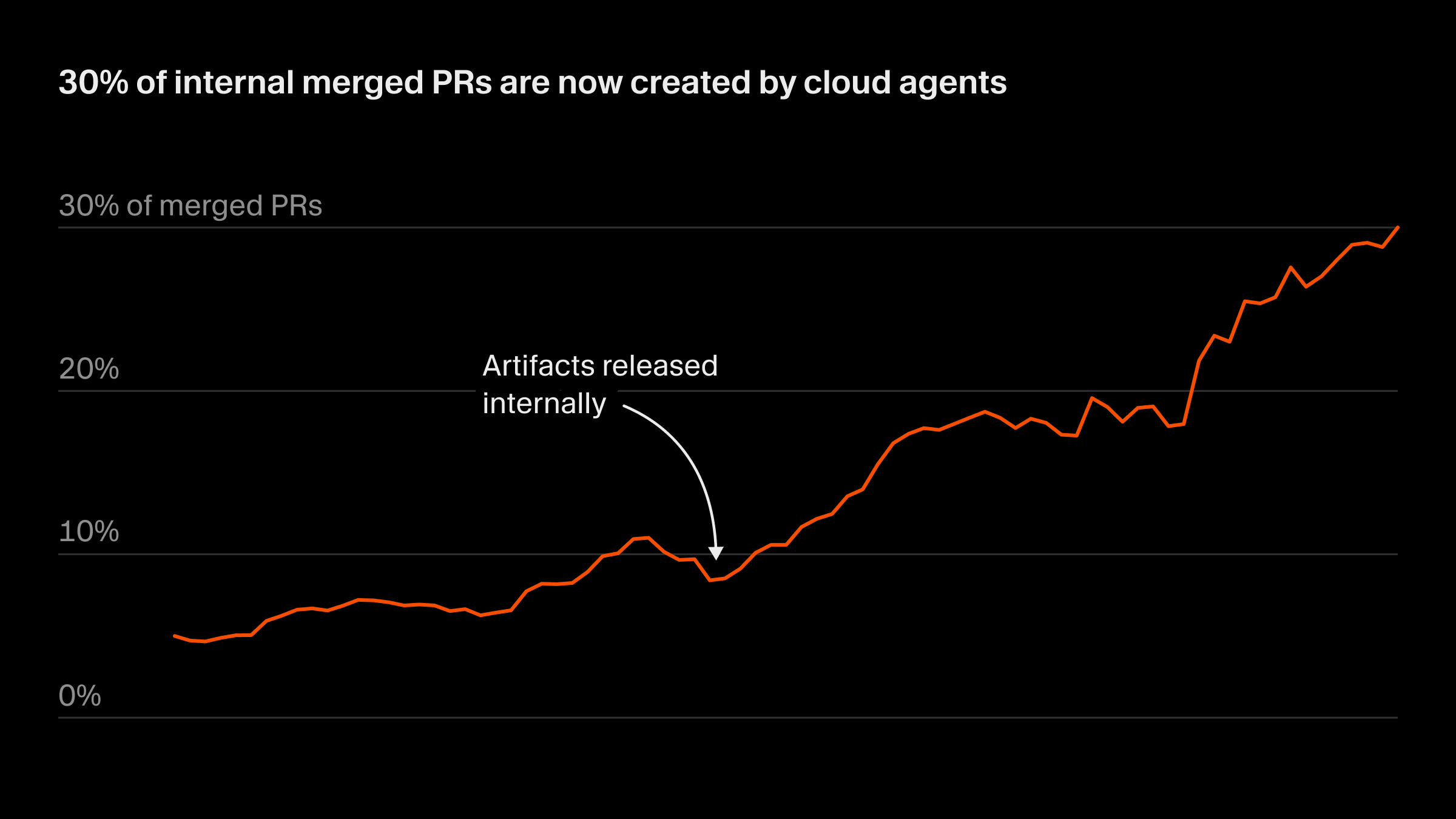
Source: Cursor Engineering Blog. Cursor uses its own Cloud Agents to create 30% of its internal merged PRs.
Model flexibility is a selling point: switch between Claude Opus 5, Claude Sonnet 5, GPT-5.6, Gemini 3.1 Pro, and Cursor's own models mid-session. Plans are Hobby ($0), Individual from $20/mo (Pro, Pro+, Ultra), Teams ($40/user/mo), and Enterprise (custom).
Beats Claude Code: Autocomplete, visual inline diffs, multi-model support, Cloud Agents with Dev Environments, Bugbot for PR review, Teams integration, Plugin Marketplace.
Falls short: Credit-based billing can spike (heavy users report $10-20 daily overages), VS Code fork ties you to one editor ecosystem, no hooks or Agent SDK, less effective on 20+ file refactoring.
Cursor now bills from two separate monthly usage pools. The Cursor Models pool covers its own in-house models (Grok 4.6 and Grok 4.5, jointly trained with SpaceXAI, and Composer 2.5 at $0.5 in / $2.5 out per M tokens) with significantly more included usage. The Other Models pool covers third-party models at their API rates, so a session on Claude Opus 5 ($5/$25) drains it roughly ten times faster than the same session on Composer 2.5. Pro, Pro+, and Ultra include both pools; the India-only Start plan includes only the Cursor Models pool.
6. Cline: Open-Source VS Code Agent
Cline is the most popular open-source AI coding extension with 5M+ installs across VS Code, Cursor, JetBrains, Zed, and Neovim. Now at v4.1.16 (August 26, 2026) with 67.2K GitHub stars. Automatic model routing picks the cheapest capable model per task, bringing typical monthly API costs to $8-12.
Its Plan and Act architecture separates information gathering from code changes. Step-by-step approval means no surprise edits. Recent updates added enterprise-managed skills and Cerebras as a provider with reasoning-capable models. Roo Code (the main Cline fork) shut down on May 15, 2026, pushing its users back to Cline.
Beats Claude Code: Free with any model, auto model routing ($8-12/mo typical), visual step-by-step approval, native subagents, headless CI/CD, enterprise skills, weekly releases.
Falls short: API costs can spike on complex tasks without auto-routing, step-by-step approval slows large refactors, no Agent Teams or hooks system.
7. GitHub Copilot: Usage-Based Multi-Agent Platform
Copilot now bills in GitHub AI Credits. Pro is $10/mo with 1,000 base credits plus a 500 flex allotment (1,500 total). Pro+ is $39/mo for 7,000 total. Max is $100/mo for 20,000 total. Copilot Business is $19 per granted seat with 1,900 credits per user, Enterprise $39 with 3,900, pooled across the enterprise, and usage past the pool costs $0.01 per credit. Code completions and next-edit suggestions are not billed in credits and stay unlimited on every paid plan.
Autopilot mode runs autonomous agent sessions without stopping for approval. Cloud agent sessions launch directly from the IDE. Semantic search works across any workspace, and grep-style queries span GitHub repos and orgs. The model list is the broadest of any tool here: Claude Opus 5, Fable 5, and Sonnet 5, the GPT-5.6 family, Gemini 3.x, Grok 4.6, and Kimi K3, with premium models gated to Pro+ and above.
Beats Claude Code: Multi-model across five providers, BYOK support, cheapest subscription ($10/mo), Autopilot agents, unmetered completions, native GitHub integration, enterprise controls with SSO.
Falls short: Less depth per-model than native Claude Code, credit accounting adds complexity, no hooks or Agent SDK, premium models restricted above Pro, and new self-serve Business and Enterprise purchases have been paused since April 22, 2026.
8. Windsurf, Now Devin Desktop: AI IDE with Built-In Devin
Cognition folded Windsurf into the Devin product line. The IDE now ships as Devin Desktop, its local agent as Devin Local, and the cloud agent as Devin Cloud, all on one changelog and one subscription. Devin's own SWE 1.7 model is the house model and is free to use on paid plans alongside frontier models from OpenAI, Anthropic, and Google.
Recent releases untied the Agent Command Center from a single folder, let any number of agent windows run side by side, split it into its own window through devin.agentWindow.location, and sped up Agent/Editor switching (Ctrl/Cmd+G). Devin Local added plan mode with a reviewable Markdown plan file and an explicit Implement button, individually stoppable subagents, and post_setup_worktree hooks. Devin Cloud added streaming shell output and better session filtering.
Pricing is Devin's: Free, Pro at $20/mo, Max at $200/mo, Teams at $80/mo plus $40 per full dev seat, and Enterprise. Pro includes Devin Cloud agents and free SWE 1.7 usage; extra usage is bought at API pricing.
Beats Claude Code: One subscription across desktop IDE, local agent, and cloud agent, Agent Command Center for parallel sessions, reviewable plan files, free house model, unlimited tab completion.
Falls short: The Windsurf brand is gone, so docs and extensions have moved; smaller extension ecosystem than VS Code; quotas rather than published per-model limits.
Autonomous Agents
9. Google Antigravity: Agent-First IDE
Antigravity is Google's agent-first IDE, built from scratch (not a VS Code fork). The April 2026 update overhauled the permissions system, integrated AgentKit 2.0 for deeper agent-building capabilities, and added A2A (Agent-to-Agent) protocol support for interoperability with LangChain, AutoGen, and other A2A-compatible agents.
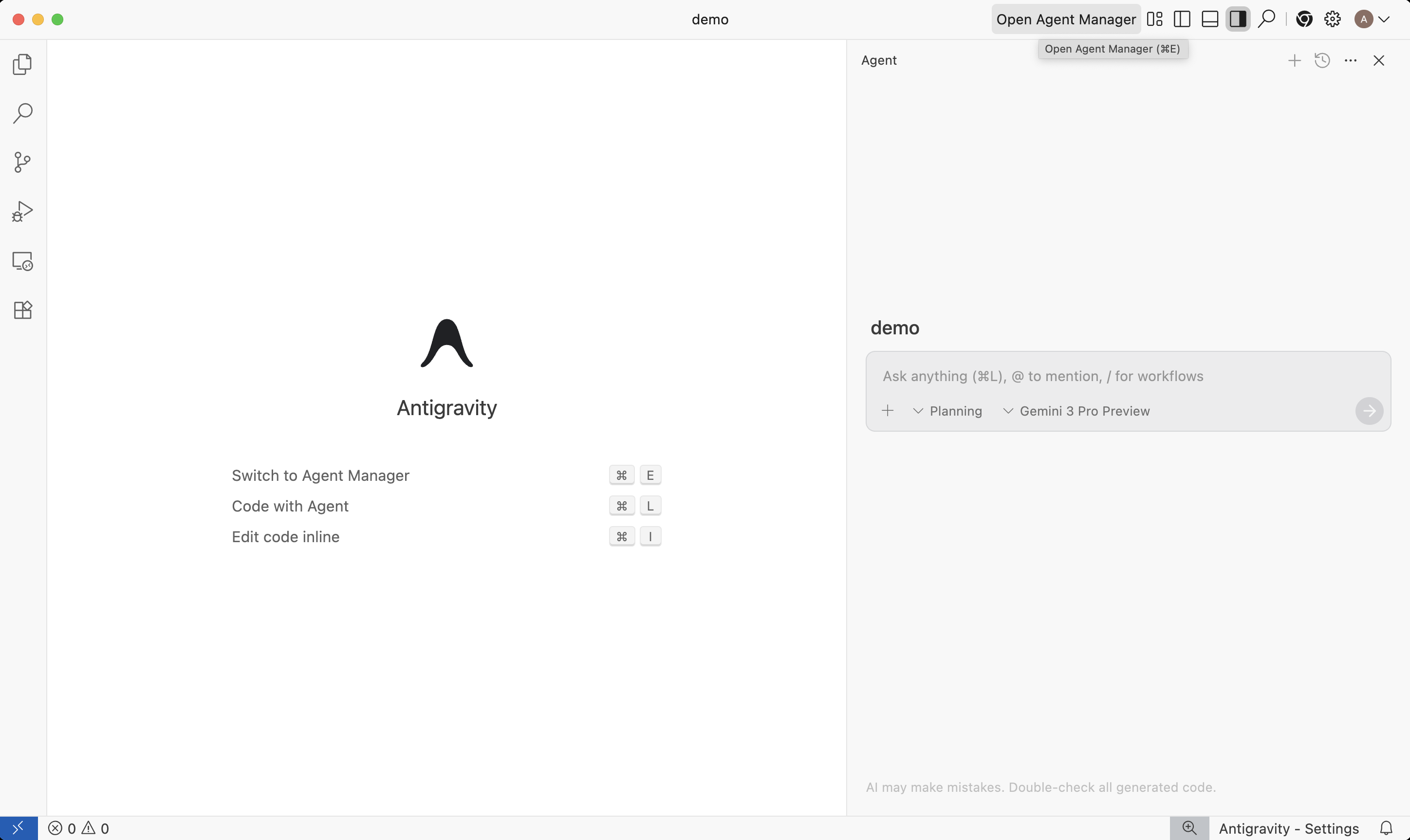
Google Antigravity: Editor view with Agent Manager panel. Source: Google Developers Blog.
Spring 2026 pricing revisions relaxed limits on several plans, particularly the Pro tier. The context window expanded for large codebases, and Gemini 3.1 Pro is available as the primary model. The extension ecosystem is still sparse compared to VS Code.
10. Devin: Fully Autonomous Software Engineer
Devin is not a traditional Claude Code alternative. It is a fully autonomous coding agent that works through Slack and the web. You assign tasks conversationally, and Devin executes them in its own cloud sandbox with shell, browser, and editor access. It is also the cloud half of Devin Desktop, one click away from a local session.
The ACU meter is gone from the self-serve plans. Pricing is now Free, Pro at $20/mo (Devin Cloud agents, free SWE 1.7 and open-source model usage, extra usage at API pricing), Max at $200/mo for significantly higher quotas, Teams at $80/mo plus $40 per full dev seat with pooled admin and analytics, and Enterprise with SSO, dedicated deployment, and account management.
Beats Claude Code: Full autonomy, Slack and IDE handoff, cloud sandbox, overnight tasks, flat monthly quotas instead of per-unit metering, admin analytics on team plans.
Falls short: Quota-based plans are opaque compared with published per-model limits, no interactive terminal loop, Max at $200/mo for heavy use, less developer control during execution.
Quick Takes: Niche Alternatives
These tools serve specific use cases well but have narrower appeal than the tools above.
Amazon Q Developer / Kiro
Amazon's AI coding assistant is built for AWS-heavy teams. It understands your infrastructure (not just your code), generates CloudFormation and CDK templates, and includes built-in security scanning. Amazon is transitioning Q Developer to Kiro, where the frontier models are exclusive, and Q Developer IDE plugins reach end of support in April 2027. Kiro ships fast on both surfaces: CLI 2.20.0 (August 26, 2026) added a full-screen spec task-execution view with task-scope selection and scrollback preservation, and IDE 1.0.395 (August 27, 2026) added third-party extension compatibility and more reliable MCP sign-in. If your stack runs on AWS, evaluate Kiro rather than Q Developer.
Continue.dev
Continue (35.7K GitHub stars) pivoted in 2026 from a coding assistant to a CI quality control platform. The new focus: open-source CLI agents that run on every pull request, enforcing team rules and catching issues automatically. The IDE extensions still exist but are no longer the primary product. If you need an AI coding assistant, Cline or Aider are better choices now. If you need automated PR review and CI-integrated code quality checks, Continue fills a gap the other tools on this list do not address.
Pricing Breakdown
Pricing for AI coding tools in 2026 is more complex than a monthly number. Credit systems, token-based billing, and model-specific pricing mean the sticker price rarely tells the full story.
| Tool | Free Tier | Paid Start | Power User |
|---|---|---|---|
| Claude Code | Limited | $20/mo (Claude Pro) | $100+/mo (Max 5x / 20x) |
| Cursor | Hobby (limited) | $20/mo (Individual) | Pro+ / Ultra, $40/user Teams |
| Aider | Unlimited (tool) | Pay per token | ~$30-80/mo typical |
| Codex | No | $20/mo (Plus) | Pro 5x / 20x + credits |
| Cline | Unlimited (tool) | Pay per token | ~$8-12/mo (auto-routing) |
| GitHub Copilot | Credit allowance | $10/mo (1,500 credits) | $39 (7,000) / $100 (20,000) |
| Devin Desktop (was Windsurf) | Free plan | $20/mo (Pro) | $200/mo (Max) |
| OpenCode | Unlimited (tool) | Pay per token | ~$20-50/mo typical |
| Antigravity CLI | Free tier | Google AI plans | Enterprise (Gemini Code Assist) |
| Antigravity | Free tier | Pro (pricing relaxed) | Enterprise |
| Continue.dev | Unlimited (CI tool) | Pay per token | ~$20-50/mo typical |
Cheapest Path to Terminal AI Coding
Antigravity CLI has a free tier on a personal Google account and is the cheapest hosted option now that Gemini CLI no longer serves consumer plans. Cline's auto model routing brings BYOK costs to $8-12/mo by picking the cheapest capable model per task. For other BYOK tools (OpenCode, Aider), a cheap open-weight model such as DeepSeek V4 Flash costs roughly $5-15/month. Local models via Ollama bring API costs to zero. On subscriptions, Copilot Pro at $10/mo with 1,500 credits and unmetered completions is the cheapest paid seat here.
Routing Claude Code by Difficulty (The Enterprise Cost Lever)
Switching tools is one way to escape the bill. The other is to stop sending routine work to the most expensive model. When a whole team runs Claude Code, every developer's agent defaults to Opus for tasks Haiku handles identically: renaming a variable, formatting output, writing a boilerplate test, summarizing a diff. 60-80% of coding-agent requests are routine, so the token bill grows with how hard the org uses the agent, not with headcount. This is the same problem whether the team is on Claude Code, Cursor, or Cline.
A model router sits between Claude Code and the Anthropic API. It reads each turn, classifies difficulty and ambiguity, and picks the cheapest Claude model that handles it: easy to Haiku 4.5 ($1/$5 per M tokens), medium to Sonnet 5 ($2/$10), hard to Opus 5 ($5/$25). Admins set the policy once and it applies to every seat, so no individual developer is deciding to burn Opus on a one-line edit. Routing stays inside the Claude family, so the data and the contract never leave Anthropic.
Morph Router classifies each request into easy, medium, and hard and routes to the tier the admin assigned in the matrix above. For a team consolidating on Anthropic, the property that matters is Anthropic-only routing: the rollout stays on Claude models, spend limits and the routing policy are set per org, and a new Claude model can be added to the tiers without changing prompts. See the full Claude Code Enterprise writeup on SSO, per-seat controls, and the token cap, or the LLM cost optimization guide.
When to Stay on Claude Code
Claude Code is still the best choice if you:
- Need deep context understanding across large codebases. Opus 5 takes a 1M-token context with adaptive thinking on high effort by default, and Fable 5 adds a frontier reasoning tier above it. Extended thinking produces better results on complex, multi-file refactors than any current alternative.
- Prefer terminal-first workflows. Claude Code's hooks system, Agent Teams, Agent View, native binary CLI, and custom themes are the most mature in the terminal CLI category.
- Rely on Opus-class reasoning for complex refactors. When accuracy on the first pass matters more than cost, Opus 5 at high effort still leads on tasks that require genuine reasoning across thousands of lines.
- Use Agent Teams. No alternative offers inter-agent messaging and task delegation at the same level. The new /ultrareview uses parallel multi-agent analysis for code review at scale.
Most developers who try alternatives end up using 2-3 tools: Claude Code for hard problems, an IDE tool for daily coding, and sometimes an autonomous agent for batch tasks. Switching does not have to mean replacing.
The Apply Problem: Where All Tools Struggle
Every tool on this list generates code diffs. The quality difference between them often comes down to how those diffs get applied to your files.
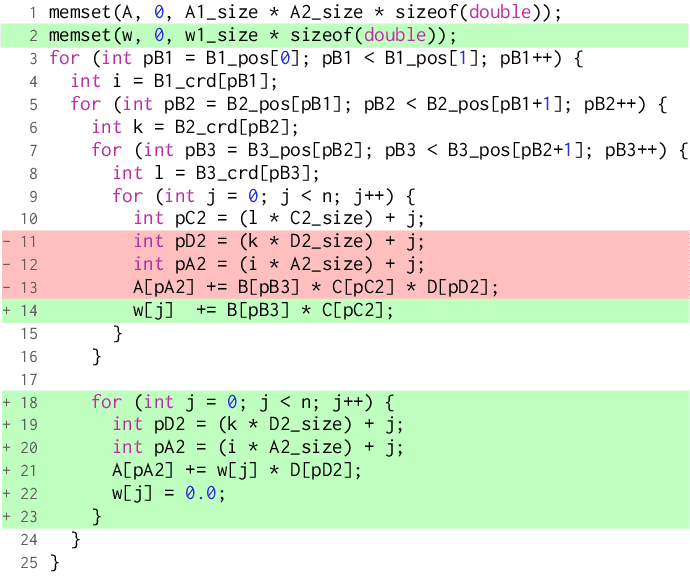
Claude Code uses search-and-replace blocks that break when the search string matches multiple locations or when the file has changed since the AI read it. Aider uses its Polyglot diff format that can misalign on large files with similar code blocks. Cursor uses its own apply model. Each approach has failure modes that cause retries, manual fixes, or silent corruption.
The apply step is downstream of generation. It does not matter how good the AI's reasoning is if the edit does not land correctly in the file.
Morph Fast Apply is a dedicated apply layer that works underneath any coding tool. At 10,500+ tokens/second with 98% first-pass accuracy, it processes code edits from Claude Code, Aider, Cursor, or Codex and applies them correctly. Instead of choosing your tool based on which one applies edits best, choose based on workflow fit and let Morph handle the apply step.
Morph Fast Apply: Universal Apply Layer
# Works with any AI coding tool's output
curl -X POST https://api.morphllm.com/v1/code/apply \
  -H "Authorization: Bearer $MORPH_API_KEY" \
  -H "Content-Type: application/json" \
  -d '{
    "model": "morph-v3-fast",
    "instructions": "What the edit does, in one sentence",
    "initial_code": "// your current file contents",
    "edit_snippet": "// AI-generated changes from any tool, with // ... existing code ... markers"
  }'

# 10,500+ tok/sec | 98% first-pass accuracy
# Works with Claude Code, Aider, Cursor, Codex
Frequently Asked Questions
Can I use Claude Code and an alternative at the same time?
Yes. Most developers use 2-3 tools for different tasks. A common setup: Claude Code for complex multi-file refactors, Cursor or Cline for daily IDE coding with autocomplete, and Codex or Devin for autonomous batch tasks. The tools serve different roles and rarely conflict. Files are just files, so any tool can pick up where another left off.
Which alternative handles monorepos best?
Cursor and Cline handle multi-root workspaces natively through VS Code, and Devin Desktop supports multi-root workspaces containing virtual filesystem folders. Aider's repo-map feature indexes entire codebases regardless of size. OpenCode's LSP integration provides fast symbol navigation across packages. Claude Opus 5 and Sonnet 5 both accept 1M tokens, so Claude Code can ingest a large monorepo in one pass too.
Is Claude Max worth it vs switching tools?
Max starts at $100/mo and sells 5x or 20x Pro usage with priority access and higher output limits, so it is worth it when Claude Opus 5 reasoning is the thing you are buying. For the same money, Codex Pro sells 5x or 20x published per-model limits, Devin Max is $200/mo for much higher quotas, and a BYOK tool spends every dollar on tokens with no subscription markup.
What is the best free alternative?
Antigravity CLI has a free tier on a personal Google account and is the supported Google terminal agent now that Gemini CLI no longer serves consumer plans. OpenCode (202K GitHub stars), Cline, and Aider are free and open-source with BYOK pricing, and Ollama runs local models through all three at zero API cost. Copilot Free and Copilot Student include an AI-credit allowance.
How do I cut Claude Code cost across a team without switching tools?
Route by difficulty. 60-80% of coding-agent requests are routine and run identically on Haiku 4.5 ($1/M) as on Opus 5 ($5/M). A model router classifies each turn and sends easy work to the cheaper Claude model, reserving Opus for hard tasks, cutting per-seat token spend 40-70%. Morph Router classifies in ~430ms at $0.001 and routes within the Anthropic family, so the data stays with one provider, and admins set the policy once for every seat. See the Claude Code Enterprise guide for SSO and per-seat spend controls.
Does Claude Code work with other models?
No. Claude Code only supports Anthropic's Claude models (Fable 5, Opus 5, Sonnet 5, Haiku 4.5). For model flexibility, OpenCode supports 75+ providers, Cline connects to 10+ providers including local models, and GitHub Copilot mixes Claude, GPT-5.6, Gemini, Grok, and Kimi under one subscription.
Related Comparisons
Speed Up Any AI Coding Tool with Morph Fast Apply
Morph processes code edits at 10,500+ tok/sec with 98% accuracy. Works as the apply layer for Claude Code, Cursor, Aider, Codex, and any other tool.